SELECT
The SELECT statement is used to read data from TiDB.
Synopsis
SelectStmt:

FromDual:

SelectStmtOpts:

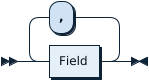
SelectStmtFieldList:
TableRefsClause:
- TableRefsClause
- AsOfClause
TableRefsClause ::=
    TableRef AsOfClause? ( ',' TableRef AsOfClause? )*

AsOfClause ::=
    'AS' 'OF' 'TIMESTAMP' Expression
WhereClauseOptional:

SelectStmtGroup:

HavingClause:

OrderByOptional:

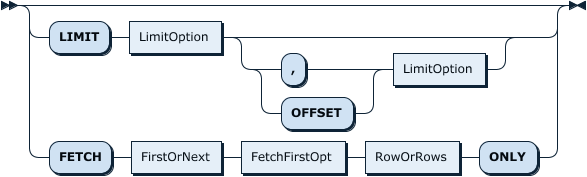
SelectStmtLimit:
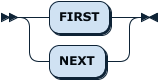
FirstOrNext:
FetchFirstOpt:

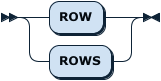
RowOrRows:
SelectLockOpt:
- SelectLockOpt
- TableList
SelectLockOpt ::=
    ( ( 'FOR' 'UPDATE' ( 'OF' TableList )? 'NOWAIT'? )
|   ( 'LOCK' 'IN' 'SHARE' 'MODE' ) )?

TableList ::=
    TableName ( ',' TableName )*
WindowClauseOptional
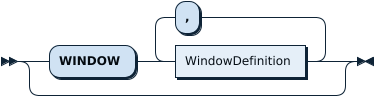
TableSampleOpt
- TableSampleOpt
TableSampleOpt ::=
    'TABLESAMPLE' 'REGIONS()'
Description of the syntax elements
Examples
SELECT
mysql> CREATE TABLE t1 (id INT NOT NULL PRIMARY KEY AUTO_INCREMENT, c1 INT NOT NULL);
Query OK, 0 rows affected (0.11 sec)

mysql> INSERT INTO t1 (c1) VALUES (1),(2),(3),(4),(5);
Query OK, 5 rows affected (0.03 sec)
Records: 5  Duplicates: 0  Warnings: 0

mysql> SELECT * FROM t1;
+----+----+
| id | c1 |
+----+----+
|  1 |  1 |
|  2 |  2 |
|  3 |  3 |
|  4 |  4 |
|  5 |  5 |
+----+----+
5 rows in set (0.00 sec)
mysql> SELECT AVG(s_quantity), COUNT(s_quantity) FROM stock TABLESAMPLE REGIONS();
+-----------------+-------------------+
| AVG(s_quantity) | COUNT(s_quantity) |
+-----------------+-------------------+
|         59.5000 |                 4 |
+-----------------+-------------------+
1 row in set (0.00 sec)

mysql> SELECT AVG(s_quantity), COUNT(s_quantity) FROM stock;
+-----------------+-------------------+
| AVG(s_quantity) | COUNT(s_quantity) |
+-----------------+-------------------+
|         54.9729 |           1000000 |
+-----------------+-------------------+
1 row in set (0.52 sec)
The above example uses data generated with tiup bench tpcc prepare. The first query shows the use of TABLESAMPLE.
SELECT ... INTO OUTFILE
The SELECT ... INTO OUTFILE statement is used to write the result of a query to a file.
In the statement, you can specify the format of the output file by using the following clauses:
FIELDS TERMINATED BY: specifies the field delimiter in the file. For example, you can specify it as','to output comma-separated values (CSV) or'\t'to output tab-separated values (TSV).FIELDS ENCLOSED BY: specifies the enclosing character that wraps around each field in the file.LINES TERMINATED BY: specifies the line terminator in the file, if you want to end a line with a certain character.
Assume that there is a table t with three columns as follows:
mysql> CREATE TABLE t (a INT, b VARCHAR(10), c DECIMAL(10,2));
Query OK, 0 rows affected (0.02 sec)

mysql> INSERT INTO t VALUES (1, 'a', 1.1), (2, 'b', 2.2), (3, 'c', 3.3);
Query OK, 3 rows affected (0.01 sec)
The following examples show how to use the SELECT ... INTO OUTFILE statement to write the query result to a file.
Example 1:
mysql> SELECT * FROM t INTO OUTFILE '/tmp/tmp_file1';
Query OK, 3 rows affected (0.00 sec)
In this example, you can find the query result in /tmp/tmp_file1 as follows:
1       a       1.10
2       b       2.20
3       c       3.30
Example 2:
mysql> SELECT * FROM t INTO OUTFILE '/tmp/tmp_file2' FIELDS TERMINATED BY ',' ENCLOSED BY '"';
Query OK, 3 rows affected (0.00 sec)
In this example, you can find the query result in /tmp/tmp_file2 as follows:
"1","a","1.10"
"2","b","2.20"
"3","c","3.30"
Example 3:
mysql> SELECT * FROM t INTO OUTFILE '/tmp/tmp_file3'
    -> FIELDS TERMINATED BY ',' ENCLOSED BY '\'' LINES TERMINATED BY '<<<\n';
Query OK, 3 rows affected (0.00 sec)
In this example, you can find the query result in /tmp/tmp_file3 as follows:
'1','a','1.10'<<<
'2','b','2.20'<<<
'3','c','3.30'<<<
MySQL compatibility
- The syntax
SELECT ... INTO @variableis not supported. - The syntax
SELECT ... GROUP BY ... WITH ROLLUPis not supported. - The syntax
SELECT ... INTO DUMPFILEis not supported. - The syntax
SELECT .. GROUP BY exprdoes not implyGROUP BY expr ORDER BY expras it does in MySQL 5.7. TiDB instead matches the behavior of MySQL 8.0 and does not imply a default order. - The syntax
SELECT ... TABLESAMPLE ...is a TiDB extension designed for compatibility with other database systems and the ISO/IEC 9075-2 standard, but currently it is not supported by MySQL.