EXPLAIN
The EXPLAIN statement shows the execution plan for a query without executing it. It is complimented by EXPLAIN ANALYZE which will execute the query. If the output of EXPLAIN does not match the expected result, consider executing ANALYZE TABLE on each table in the query.
The statements DESC and DESCRIBE are aliases of this statement. The alternative usage of EXPLAIN <tableName> is documented under SHOW [FULL] COLUMNS FROM.
TiDB supports the EXPLAIN [options] FOR CONNECTION connection_id statement. However, this statement is different from the EXPLAIN FOR statement in MySQL. For more details, see EXPLAIN FOR CONNECTION.
Synopsis
- ExplainSym
- ExplainStmt
- ExplainableStmt
ExplainSym ::=
    'EXPLAIN'
|   'DESCRIBE'
|   'DESC'

ExplainStmt ::=
    ExplainSym ( TableName ColumnName? | 'ANALYZE'? ExplainableStmt | 'FOR' 'CONNECTION' NUM | 'FORMAT' '=' ( stringLit | ExplainFormatType ) ( 'FOR' 'CONNECTION' NUM | ExplainableStmt ) )

ExplainableStmt ::=
    SelectStmt
|   DeleteFromStmt
|   UpdateStmt
|   InsertIntoStmt
|   ReplaceIntoStmt
|   UnionStmt
EXPLAIN output format
Currently, EXPLAIN in TiDB outputs 5 columns: id, estRows, task, access object, operator info. Each operator in the execution plan is described by these attributes, with each row in the EXPLAIN output describing an operator. The description of each attribute is as follows:
Examples
EXPLAIN SELECT 1;
+-------------------+---------+------+---------------+---------------+
| id                | estRows | task | access object | operator info |
+-------------------+---------+------+---------------+---------------+
| Projection_3      | 1.00    | root |               | 1->Column#1   |
| └─TableDual_4     | 1.00    | root |               | rows:1        |
+-------------------+---------+------+---------------+---------------+
2 rows in set (0.00 sec)
CREATE TABLE t1 (id INT NOT NULL PRIMARY KEY AUTO_INCREMENT, c1 INT NOT NULL);
Query OK, 0 rows affected (0.10 sec)
INSERT INTO t1 (c1) VALUES (1), (2), (3);
Query OK, 3 rows affected (0.02 sec)
Records: 3  Duplicates: 0  Warnings: 0
EXPLAIN SELECT * FROM t1 WHERE id = 1;
+-------------+---------+------+---------------+---------------+
| id          | estRows | task | access object | operator info |
+-------------+---------+------+---------------+---------------+
| Point_Get_1 | 1.00    | root | table:t1      | handle:1      |
+-------------+---------+------+---------------+---------------+
1 row in set (0.00 sec)
DESC SELECT * FROM t1 WHERE id = 1;
+-------------+---------+------+---------------+---------------+
| id          | estRows | task | access object | operator info |
+-------------+---------+------+---------------+---------------+
| Point_Get_1 | 1.00    | root | table:t1      | handle:1      |
+-------------+---------+------+---------------+---------------+
1 row in set (0.00 sec)
DESCRIBE SELECT * FROM t1 WHERE id = 1;
+-------------+---------+------+---------------+---------------+
| id          | estRows | task | access object | operator info |
+-------------+---------+------+---------------+---------------+
| Point_Get_1 | 1.00    | root | table:t1      | handle:1      |
+-------------+---------+------+---------------+---------------+
1 row in set (0.00 sec)
EXPLAIN INSERT INTO t1 (c1) VALUES (4);
+----------+---------+------+---------------+---------------+
| id       | estRows | task | access object | operator info |
+----------+---------+------+---------------+---------------+
| Insert_1 | N/A     | root |               | N/A           |
+----------+---------+------+---------------+---------------+
1 row in set (0.00 sec)
EXPLAIN UPDATE t1 SET c1=5 WHERE c1=3;
+---------------------------+---------+-----------+---------------+--------------------------------+
| id                        | estRows | task      | access object | operator info                  |
+---------------------------+---------+-----------+---------------+--------------------------------+
| Update_4                  | N/A     | root      |               | N/A                            |
| └─TableReader_8           | 0.00    | root      |               | data:Selection_7               |
|   └─Selection_7           | 0.00    | cop[tikv] |               | eq(test.t1.c1, 3)              |
|     └─TableFullScan_6     | 3.00    | cop[tikv] | table:t1      | keep order:false, stats:pseudo |
+---------------------------+---------+-----------+---------------+--------------------------------+
4 rows in set (0.00 sec)
EXPLAIN DELETE FROM t1 WHERE c1=3;
+---------------------------+---------+-----------+---------------+--------------------------------+
| id                        | estRows | task      | access object | operator info                  |
+---------------------------+---------+-----------+---------------+--------------------------------+
| Delete_4                  | N/A     | root      |               | N/A                            |
| └─TableReader_8           | 0.00    | root      |               | data:Selection_7               |
|   └─Selection_7           | 0.00    | cop[tikv] |               | eq(test.t1.c1, 3)              |
|     └─TableFullScan_6     | 3.00    | cop[tikv] | table:t1      | keep order:false, stats:pseudo |
+---------------------------+---------+-----------+---------------+--------------------------------+
4 rows in set (0.01 sec)
To specify the format of the EXPLAIN output, you can use the FORMAT = xxx syntax. Currently, TiDB supports the following formats:
The following is an example when FORMAT is "brief" in EXPLAIN:
EXPLAIN FORMAT = "brief" DELETE FROM t1 WHERE c1 = 3;
+-------------------------+---------+-----------+---------------+--------------------------------+
| id                      | estRows | task      | access object | operator info                  |
+-------------------------+---------+-----------+---------------+--------------------------------+
| Delete                  | N/A     | root      |               | N/A                            |
| └─TableReader           | 0.00    | root      |               | data:Selection                 |
|   └─Selection           | 0.00    | cop[tikv] |               | eq(test.t1.c1, 3)              |
|     └─TableFullScan     | 3.00    | cop[tikv] | table:t1      | keep order:false, stats:pseudo |
+-------------------------+---------+-----------+---------------+--------------------------------+
4 rows in set (0.001 sec)
In addition to the MySQL standard result format, TiDB also supports DotGraph and you need to specify FORMAT = "dot" as in the following example:
CREATE TABLE t(a bigint, b bigint);
EXPLAIN format = "dot" SELECT A.a, B.b FROM t A JOIN t B ON A.a > B.b WHERE A.a < 10;
+-----------------------------------------------------------------------------------------------------------------------------------------------------------------------------------------------------------------------------------------------------------------------------------------------------------------------------------------------------------------------------------------------------------------------------------------------------------------------------------------------------------------------------------------------------------------------------+
| dot contents                                                                                                                                                                                                                                                                                                                                                                                                                                                                                                                                                                |
+-----------------------------------------------------------------------------------------------------------------------------------------------------------------------------------------------------------------------------------------------------------------------------------------------------------------------------------------------------------------------------------------------------------------------------------------------------------------------------------------------------------------------------------------------------------------------------+
|
digraph Projection_8 {
subgraph cluster8{
node [style=filled, color=lightgrey]
color=black
label = "root"
"Projection_8" -> "HashJoin_9"
"HashJoin_9" -> "TableReader_13"
"HashJoin_9" -> "Selection_14"
"Selection_14" -> "TableReader_17"
}
subgraph cluster12{
node [style=filled, color=lightgrey]
color=black
label = "cop"
"Selection_12" -> "TableFullScan_11"
}
subgraph cluster16{
node [style=filled, color=lightgrey]
color=black
label = "cop"
"Selection_16" -> "TableFullScan_15"
}
"TableReader_13" -> "Selection_12"
"TableReader_17" -> "Selection_16"
}
 |
+-----------------------------------------------------------------------------------------------------------------------------------------------------------------------------------------------------------------------------------------------------------------------------------------------------------------------------------------------------------------------------------------------------------------------------------------------------------------------------------------------------------------------------------------------------------------------------+
1 row in set (0.00 sec)
If your computer has a dot program, you can generate a PNG file using the following method:
dot xx.dot -T png -O

The xx.dot is the result returned by the above statement.
If your computer has no dot program, copy the result to this website to get a tree diagram:
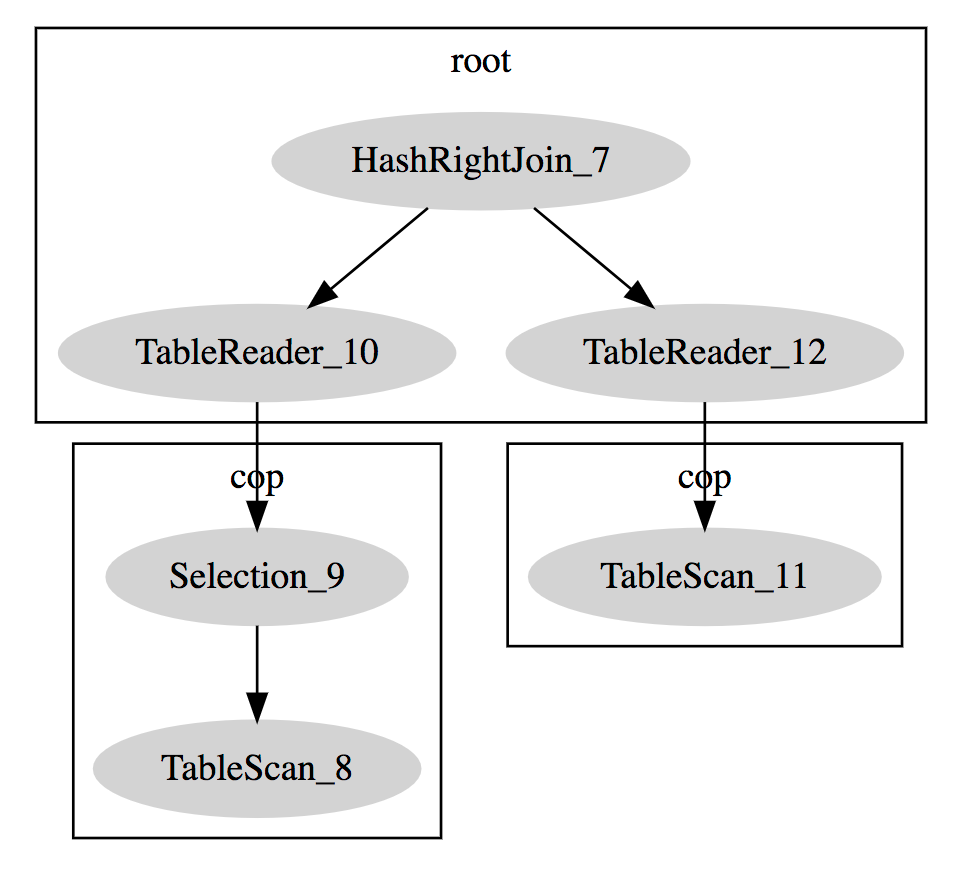
To get the output in JSON, specify FORMAT = "tidb_json" in the EXPLAIN statement. The following is an example:
CREATE TABLE t(id int primary key, a int, b int, key(a));
EXPLAIN FORMAT = "tidb_json" SELECT id FROM t WHERE a = 1;
+------------------------------------------------------------------------------------------------------------------------------------------------------------------------------------------------------------------------------------------------------------------------------------------------------------------------------------------------------------------------------------------------------------------------------------------------------------------------------------------------------------------------------------------------------------------------------------------------------------------------------------------------------------------------------------------------------------------------------------------------------------------------------------------+
| TiDB_JSON                                                                                                                                                                                                                                                                                                                                                                                                                                                                                                                                                                                                                                                                                                                                                                                |
+------------------------------------------------------------------------------------------------------------------------------------------------------------------------------------------------------------------------------------------------------------------------------------------------------------------------------------------------------------------------------------------------------------------------------------------------------------------------------------------------------------------------------------------------------------------------------------------------------------------------------------------------------------------------------------------------------------------------------------------------------------------------------------------+
| [
    {
        "id": "Projection_4",
        "estRows": "10.00",
        "taskType": "root",
        "operatorInfo": "test.t.id",
        "subOperators": [
            {
                "id": "IndexReader_6",
                "estRows": "10.00",
                "taskType": "root",
                "operatorInfo": "index:IndexRangeScan_5",
                "subOperators": [
                    {
                        "id": "IndexRangeScan_5",
                        "estRows": "10.00",
                        "taskType": "cop[tikv]",
                        "accessObject": "table:t, index:a(a)",
                        "operatorInfo": "range:[1,1], keep order:false, stats:pseudo"
                    }
                ]
            }
        ]
    }
]
 |
+------------------------------------------------------------------------------------------------------------------------------------------------------------------------------------------------------------------------------------------------------------------------------------------------------------------------------------------------------------------------------------------------------------------------------------------------------------------------------------------------------------------------------------------------------------------------------------------------------------------------------------------------------------------------------------------------------------------------------------------------------------------------------------------+
1 row in set (0.01 sec)
In the output, id, estRows, taskType, accessObject, and operatorInfo have the same meaning as the columns in the default format. subOperators is an array that stores the sub-nodes. The fields and meanings of the sub-nodes are the same as the parent node. If a field is missing, it means that the field is empty.
MySQL compatibility
- Both the format of
EXPLAINand the potential execution plans in TiDB differ substaintially from MySQL. - TiDB does not support the
FORMAT=JSONorFORMAT=TREEoptions. FORMAT=tidb_jsonin TiDB is the JSON format output of the defaultEXPLAINresult. The format and fields are different from theFORMAT=JSONoutput in MySQL.
EXPLAIN FOR CONNECTION
EXPLAIN FOR CONNECTION is used to get the execution plan of the currently executed SQL query or the last executed SQL query in a connection. The output format is the same as that of EXPLAIN. However, the implementation of EXPLAIN FOR CONNECTION in TiDB is different from that in MySQL. Their differences (apart from the output format) are listed as follows:
- If the connection is sleeping, MySQL returns an empty result, while TiDB returns the last executed query plan.
- If you try to get the execution plan of the current session, MySQL returns an error, while TiDB returns the result normally.
- MySQL requires the login user to be the same as the connection being queried, or the login user has the
PROCESSprivilege; while TiDB requires the login user to be the same as the connection being queried, or the login user has theSUPERprivilege.