BEGIN
新しいトランザクションを開始します。BEGIN と COMMIT/ROLLBACK は、トランザクションを開始し、その後コミットまたは取り消しを行うために組み合わせて使用する必要があります。
TiDB Cloud Lake はネストされたトランザクションをサポートしていないため、対応しないトランザクション文は無視されます。
BEGIN; -- Start a transaction

MERGE INTO ... -- This statement belongs to the transaction

BEGIN; -- Executing BEGIN within a transaction is ignored, no new transaction is started, no error is raised

INSERT INTO ... -- This statement also belongs to the transaction

COMMIT; -- End the transaction

INSERT INTO ... -- This statement belongs to a single-statement transaction

COMMIT; -- Executing COMMIT outside of a multi-statement transaction is ignored, no commit operation is performed, no error is raised

BEGIN; -- Start another transaction
...
複数文トランザクション内で DDL 文が実行されると、現在の複数文トランザクションがコミットされ、その後の文は別の BEGIN が発行されるまで単一文トランザクションとして実行されます。
BEGIN; -- Start a multi-statement transaction

-- DML statements here are part of the current transaction
INSERT INTO table_name (column1, column2) VALUES (value1, value2);

-- Executing a DDL statement within the transaction
CREATE TABLE new_table (column1 data_type, column2 data_type);
-- This will commit the current transaction

-- Subsequent statements are executed as single-statement transactions
UPDATE table_name SET column1 = value WHERE condition;

BEGIN; -- Start a new multi-statement transaction

-- New DML statements here are part of the new transaction
DELETE FROM table_name WHERE condition;

COMMIT; -- End the new transaction
構文
BEGIN [ TRANSACTION ]
トランザクション ID とステータス
TiDB Cloud Lake は各トランザクションに対して自動的にトランザクション ID を生成します。この ID により、どの文が同じトランザクションに属しているかを識別でき、問題のトラブルシューティングが容易になります。
TiDB Cloud Lake を使用している場合、トランザクション ID は Monitor > SQL History で確認できます。
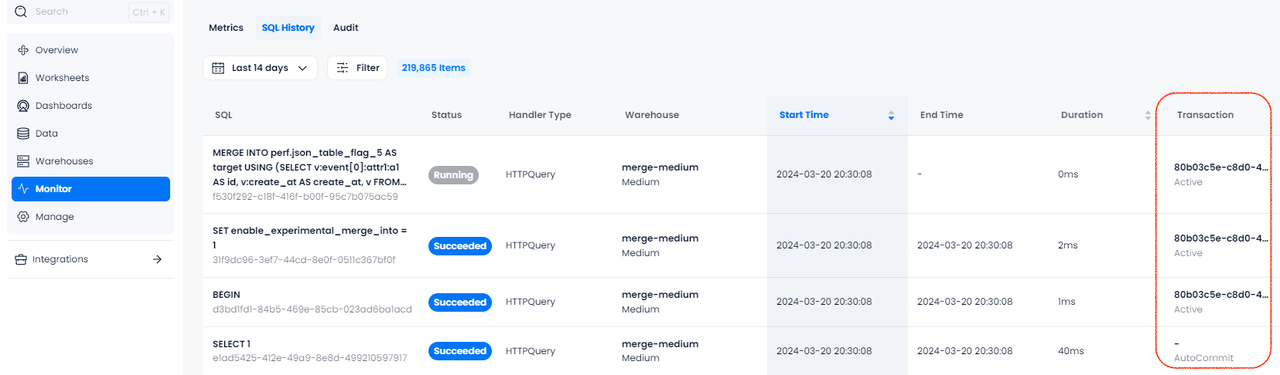
Transaction カラムでは、実行中の SQL 文のトランザクションステータスも確認できます。
例
この例では、3 つの文(INSERT、UPDATE、DELETE)はすべて同じ複数文トランザクションの一部です。これらは 1 つの単位として実行され、COMMIT が発行されると変更がまとめてコミットされます。
-- Start by creating a table
CREATE TABLE employees (
    id INT,
    name VARCHAR(50),
    department VARCHAR(50)
);

-- Start a multi-statement transaction
BEGIN;

-- First statement in the transaction: Insert a new employee
INSERT INTO employees (id, name, department) VALUES (1, 'Alice', 'HR');

-- Second statement in the transaction: Insert another new employee
INSERT INTO employees (id, name, department) VALUES (2, 'Bob', 'Engineering');

-- Third statement in the transaction: Update the department of the first employee
UPDATE employees SET department = 'Finance' WHERE id = 1;

-- Commit all the changes
COMMIT;

-- Verify that the data in the table
SELECT * FROM employees;

┌───────────────────────────────────────────────────────┐
│        id       │       name       │    department    │
├─────────────────┼──────────────────┼──────────────────┤
│               1 │ Alice            │ Finance          │
│               2 │ Bob              │ Engineering      │
└───────────────────────────────────────────────────────┘
この例では、ROLLBACK 文によってトランザクション中に行われたすべての変更が取り消されます。その結果、最後の SELECT クエリでは空の employees テーブルが表示され、変更がコミットされていないことを確認できます。
-- Start by creating a table
CREATE TABLE employees (
    id INT,
    name VARCHAR(50),
    department VARCHAR(50)
);

-- Start a multi-statement transaction
BEGIN;

-- First statement in the transaction: Insert a new employee
INSERT INTO employees (id, name, department) VALUES (1, 'Alice', 'HR');

-- Second statement in the transaction: Insert another new employee
INSERT INTO employees (id, name, department) VALUES (2, 'Bob', 'Engineering');

-- Third statement in the transaction: Update the department of the first employee
UPDATE employees SET department = 'Finance' WHERE id = 1;

-- Rollback the transaction
ROLLBACK;

-- Verify that the table is empty
SELECT * FROM employees;
この例では、ストリームと、そのストリームを消費するタスクを設定し、トランザクションブロック(BEGIN; COMMIT)を使用して 2 つのターゲットテーブルにデータを挿入します。
CREATE DATABASE my_db;
USE my_db;

CREATE TABLE source_table (
    id INT,
    source_flag VARCHAR(50),value VARCHAR(50)
);

CREATE TABLE target_table_1 (
    id INT,value VARCHAR(50)
);

CREATE TABLE target_table_2 (
    id INT,value VARCHAR(50)
);

CREATE STREAM source_stream ON TABLE source_table;

INSERT INTO source_table VALUES
(1, 'source1', 'value1'),
(2, 'source2', 'value2'),
(3, 'source3', 'value3'),
(4, 'source4', 'value4');

CREATE TASK insert_task
WAREHOUSE = 'system'
SCHEDULE = 1 SECOND AS
BEGIN
    BEGIN;
    INSERT INTO my_db.target_table_1
    SELECT id, value
    FROM my_db.source_stream;

    INSERT INTO my_db.target_table_2
    SELECT id, value
    FROM my_db.source_stream;
    COMMIT;
END;

EXECUTE TASK insert_task;