BEGIN
Starts a new transaction. BEGIN and COMMIT/ROLLBACK must be used together to start and then either save or undo a transaction.
TiDB Cloud Lake does not support nested transactions, so unmatched transaction statements will be ignored.
BEGIN; -- Start a transaction

MERGE INTO ... -- This statement belongs to the transaction

BEGIN; -- Executing BEGIN within a transaction is ignored, no new transaction is started, no error is raised

INSERT INTO ... -- This statement also belongs to the transaction

COMMIT; -- End the transaction

INSERT INTO ... -- This statement belongs to a single-statement transaction

COMMIT; -- Executing COMMIT outside of a multi-statement transaction is ignored, no commit operation is performed, no error is raised

BEGIN; -- Start another transaction
...
When a DDL statement is executed within a multi-statement transaction, it will commit the current multi-statement transaction and execute subsequent statements as single-statement transactions until another BEGIN is issued.
BEGIN; -- Start a multi-statement transaction

-- DML statements here are part of the current transaction
INSERT INTO table_name (column1, column2) VALUES (value1, value2);

-- Executing a DDL statement within the transaction
CREATE TABLE new_table (column1 data_type, column2 data_type);
-- This will commit the current transaction

-- Subsequent statements are executed as single-statement transactions
UPDATE table_name SET column1 = value WHERE condition;

BEGIN; -- Start a new multi-statement transaction

-- New DML statements here are part of the new transaction
DELETE FROM table_name WHERE condition;

COMMIT; -- End the new transaction
Syntax
BEGIN [ TRANSACTION ]
Transaction IDs & Statuses
TiDB Cloud Lake automatically generates a transaction ID for each transaction. This ID allows users to identify which statements belong to the same transaction, facilitating issue troubleshooting.
If you're on TiDB Cloud Lake, you can find the transaction IDs on Monitor > SQL History:
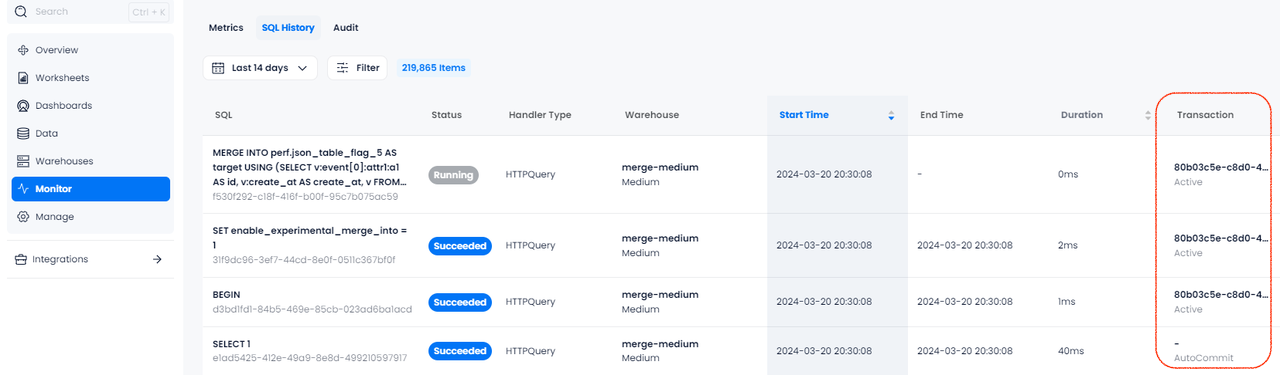
In the Transaction column, you can also see the transaction status of SQL statements during execution:
Examples
In this example, all three statements (INSERT, UPDATE, DELETE) are part of the same multi-statement transaction. They are executed as a single unit, and changes are committed together when COMMIT is issued.
-- Start by creating a table
CREATE TABLE employees (
    id INT,
    name VARCHAR(50),
    department VARCHAR(50)
);

-- Start a multi-statement transaction
BEGIN;

-- First statement in the transaction: Insert a new employee
INSERT INTO employees (id, name, department) VALUES (1, 'Alice', 'HR');

-- Second statement in the transaction: Insert another new employee
INSERT INTO employees (id, name, department) VALUES (2, 'Bob', 'Engineering');

-- Third statement in the transaction: Update the department of the first employee
UPDATE employees SET department = 'Finance' WHERE id = 1;

-- Commit all the changes
COMMIT;

-- Verify that the data in the table
SELECT * FROM employees;

┌───────────────────────────────────────────────────────┐
│        id       │       name       │    department    │
├─────────────────┼──────────────────┼──────────────────┤
│               1 │ Alice            │ Finance          │
│               2 │ Bob              │ Engineering      │
└───────────────────────────────────────────────────────┘
In this example, the ROLLBACK statement undoes all changes made during the transaction. As a result, the SELECT query at the end should show an empty employees table, confirming that no changes were committed.
-- Start by creating a table
CREATE TABLE employees (
    id INT,
    name VARCHAR(50),
    department VARCHAR(50)
);

-- Start a multi-statement transaction
BEGIN;

-- First statement in the transaction: Insert a new employee
INSERT INTO employees (id, name, department) VALUES (1, 'Alice', 'HR');

-- Second statement in the transaction: Insert another new employee
INSERT INTO employees (id, name, department) VALUES (2, 'Bob', 'Engineering');

-- Third statement in the transaction: Update the department of the first employee
UPDATE employees SET department = 'Finance' WHERE id = 1;

-- Rollback the transaction
ROLLBACK;

-- Verify that the table is empty
SELECT * FROM employees;
This example sets up a stream and a task to consume the stream, inserting data into two target tables using a transactional block (BEGIN; COMMIT).
CREATE DATABASE my_db;
USE my_db;

CREATE TABLE source_table (
    id INT,
    source_flag VARCHAR(50),value VARCHAR(50)
);

CREATE TABLE target_table_1 (
    id INT,value VARCHAR(50)
);

CREATE TABLE target_table_2 (
    id INT,value VARCHAR(50)
);

CREATE STREAM source_stream ON TABLE source_table;

INSERT INTO source_table VALUES
(1, 'source1', 'value1'),
(2, 'source2', 'value2'),
(3, 'source3', 'value3'),
(4, 'source4', 'value4');

CREATE TASK insert_task
WAREHOUSE = 'system'
SCHEDULE = 1 SECOND AS
BEGIN
    BEGIN;
    INSERT INTO my_db.target_table_1
    SELECT id, value
    FROM my_db.source_stream;

    INSERT INTO my_db.target_table_2
    SELECT id, value
    FROM my_db.source_stream;
    COMMIT;
END;

EXECUTE TASK insert_task;