虚拟列
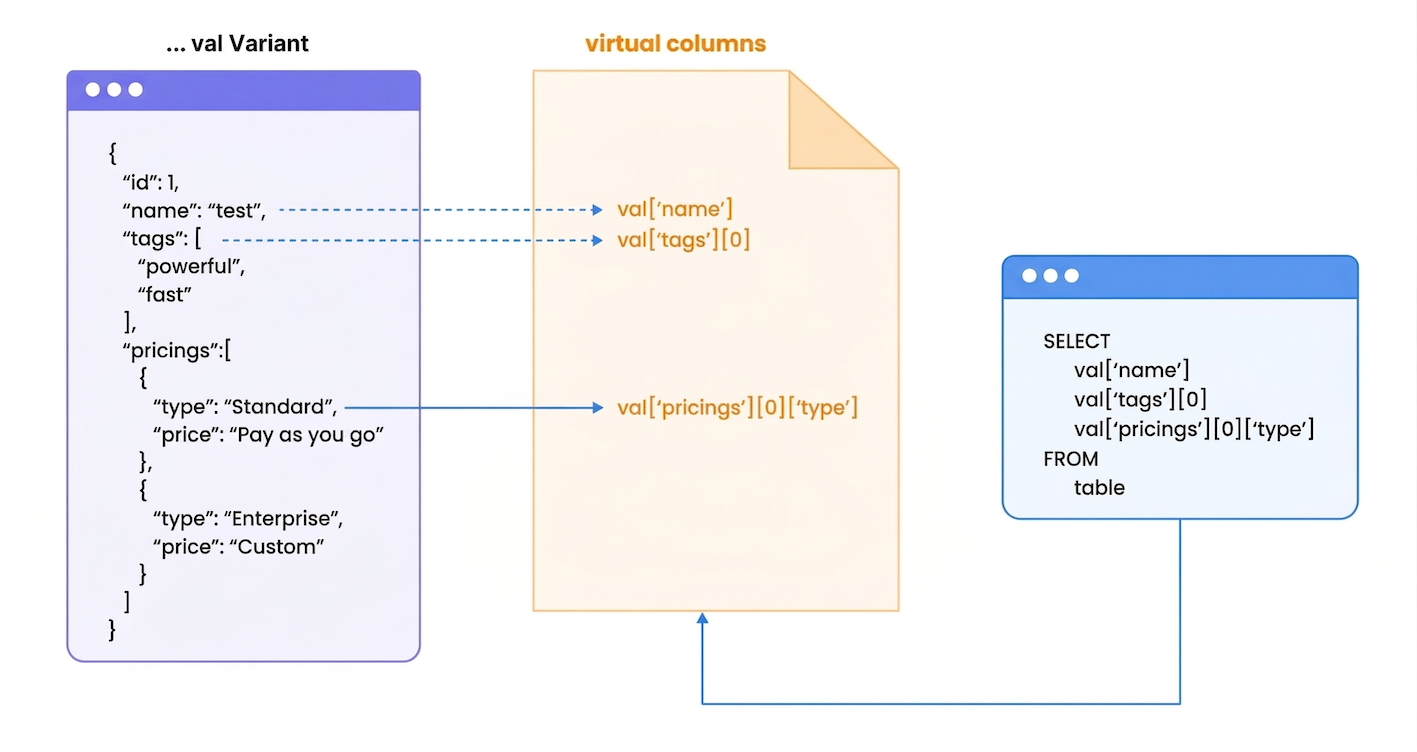
虚拟列会自动加速存储在 VARIANT 列中的半结构化数据查询。该功能为 JSON 数据访问提供零配置的性能优化。
它解决了什么问题?
查询 JSON 数据时,传统数据库每次访问嵌套字段都必须解析整个 JSON 结构。这会带来以下性能瓶颈:
示例场景:一个电商分析表将产品数据以 JSON 格式存储。如果没有虚拟列,在数百万行数据上查询 product_data['category'] 需要解析每一条 JSON 文档。使用虚拟列后,这会变成一次直接的列查找。
它如何自动工作
- 数据摄取 → TiDB Cloud Lake 分析 VARIANT 列中的 JSON 结构
- 智能检测 → 系统识别被频繁访问的嵌套字段
- 后台优化 → 自动创建虚拟列
- 查询加速 → 查询自动使用优化后的路径
配置
从 v1.2.832 开始,虚拟列默认启用,无需额外配置。
完整示例
以下示例展示了虚拟列的自动创建及其性能收益:
-- Create a table named 'test' with columns 'id' and 'val' of type Variant.
CREATE TABLE test(id int, val variant);

-- Insert sample records into the 'test' table with Variant data.
INSERT INTO
  test
VALUES
  (
    1,
    '{"id":1,"name":"datalake","tags":["powerful","fast"],"pricings":[{"type":"Standard","price":"Pay as you go"},{"type":"Enterprise","price":"Custom"}]}'
  ),
  (
    2,
    '{"id":2,"name":"databricks","tags":["scalable","flexible"],"pricings":[{"type":"Free","price":"Trial"},{"type":"Premium","price":"Subscription"}]}'
  ),
  (
    3,
    '{"id":3,"name":"snowflake","tags":["cloud-native","secure"],"pricings":[{"type":"Basic","price":"Pay per second"},{"type":"Enterprise","price":"Annual"}]}'
  ),
  (
    4,
    '{"id":4,"name":"redshift","tags":["reliable","scalable"],"pricings":[{"type":"On-Demand","price":"Pay per usage"},{"type":"Reserved","price":"1 year contract"}]}'
  ),
  (
    5,
    '{"id":5,"name":"bigquery","tags":["innovative","cost-efficient"],"pricings":[{"type":"Flat Rate","price":"Monthly"},{"type":"Flex","price":"Per query"}]}'
  );

INSERT INTO test SELECT * FROM test;
INSERT INTO test SELECT * FROM test;
INSERT INTO test SELECT * FROM test;
INSERT INTO test SELECT * FROM test;
INSERT INTO test SELECT * FROM test;

-- Explain the query execution plan for selecting specific fields from the table.
EXPLAIN
SELECT
  val ['name'],
  val ['tags'] [0],
  val ['pricings'] [0] ['type']
FROM
  test;

-[ EXPLAIN ]-----------------------------------
Exchange
├── output columns: [test.val['name'] (#3), test.val['pricings'][0]['type'] (#5), test.val['tags'][0] (#8)]
├── exchange type: Merge
└── TableScan
    ├── table: default.default.test
    ├── output columns: [val['name'] (#3), val['pricings'][0]['type'] (#5), val['tags'][0] (#8)]
    ├── read rows: 160
    ├── read size: 1.69 KiB
    ├── partitions total: 6
    ├── partitions scanned: 6
    ├── pruning stats: [segments: <range pruning: 6 to 6>, blocks: <range pruning: 6 to 6>]
    ├── push downs: [filters: [], limit: NONE]
    ├── virtual columns: [val['name'], val['pricings'][0]['type'], val['tags'][0]]
    └── estimated rows: 160.00

-- Explain the query execution plan for selecting only the 'name' field from the table.
EXPLAIN
SELECT
  val ['name']
FROM
  test;

-[ EXPLAIN ]-----------------------------------
Exchange
├── output columns: [test.val['name'] (#2)]
├── exchange type: Merge
└── TableScan
    ├── table: default.book_db.test
    ├── output columns: [val['name'] (#2)]
    ├── read rows: 160
    ├── read size: < 1 KiB
    ├── partitions total: 16
    ├── partitions scanned: 16
    ├── pruning stats: [segments: <range pruning: 6 to 6>, blocks: <range pruning: 16 to 16>]
    ├── push downs: [filters: [], limit: NONE]
    ├── virtual columns: [val['name']]
    └── estimated rows: 160.00

-- Display all the auto generated virtual columns.
SHOW VIRTUAL COLUMNS WHERE table='test';

╭────────────────────────────────────────────────────────────────────────────────────────────────────────╮
│ database │  table │ source_column │ virtual_column_id │    virtual_column_name   │ virtual_column_type │
│  String  │ String │     String    │       UInt32      │          String          │        String       │
├──────────┼────────┼───────────────┼───────────────────┼──────────────────────────┼─────────────────────┤
│ default  │ test   │ val           │        3000000000 │ ['id']                   │ UInt64              │
│ default  │ test   │ val           │        3000000001 │ ['name']                 │ String              │
│ default  │ test   │ val           │        3000000002 │ ['pricings'][0]['price'] │ String              │
│ default  │ test   │ val           │        3000000003 │ ['pricings'][0]['type']  │ String              │
│ default  │ test   │ val           │        3000000004 │ ['pricings'][1]['price'] │ String              │
│ default  │ test   │ val           │        3000000005 │ ['pricings'][1]['type']  │ String              │
│ default  │ test   │ val           │        3000000006 │ ['tags'][0]              │ String              │
│ default  │ test   │ val           │        3000000007 │ ['tags'][1]              │ String              │
╰────────────────────────────────────────────────────────────────────────────────────────────────────────╯
监控命令
性能结果
虚拟列通常可带来:
- 5-10 倍更快的 JSON 字段访问
- 自动优化,无需修改查询
- 降低资源消耗,减少查询处理期间的开销
- 为现有应用提供透明加速
虚拟列会在后台自动工作——TiDB Cloud Lake 以零配置方式优化你的 JSON 查询。