MERGE
根据语句中指定的条件和匹配标准,使用指定来源的数据,对目标表中的行执行 INSERT、UPDATE 或 DELETE 操作。
数据源可以是一个子查询,并通过 JOIN 表达式与目标数据关联。该表达式会判断来源中的每一行是否能在目标表中找到匹配行,然后决定它在下一步执行中应进入哪种子句(MATCHED 或 NOT MATCHED)。
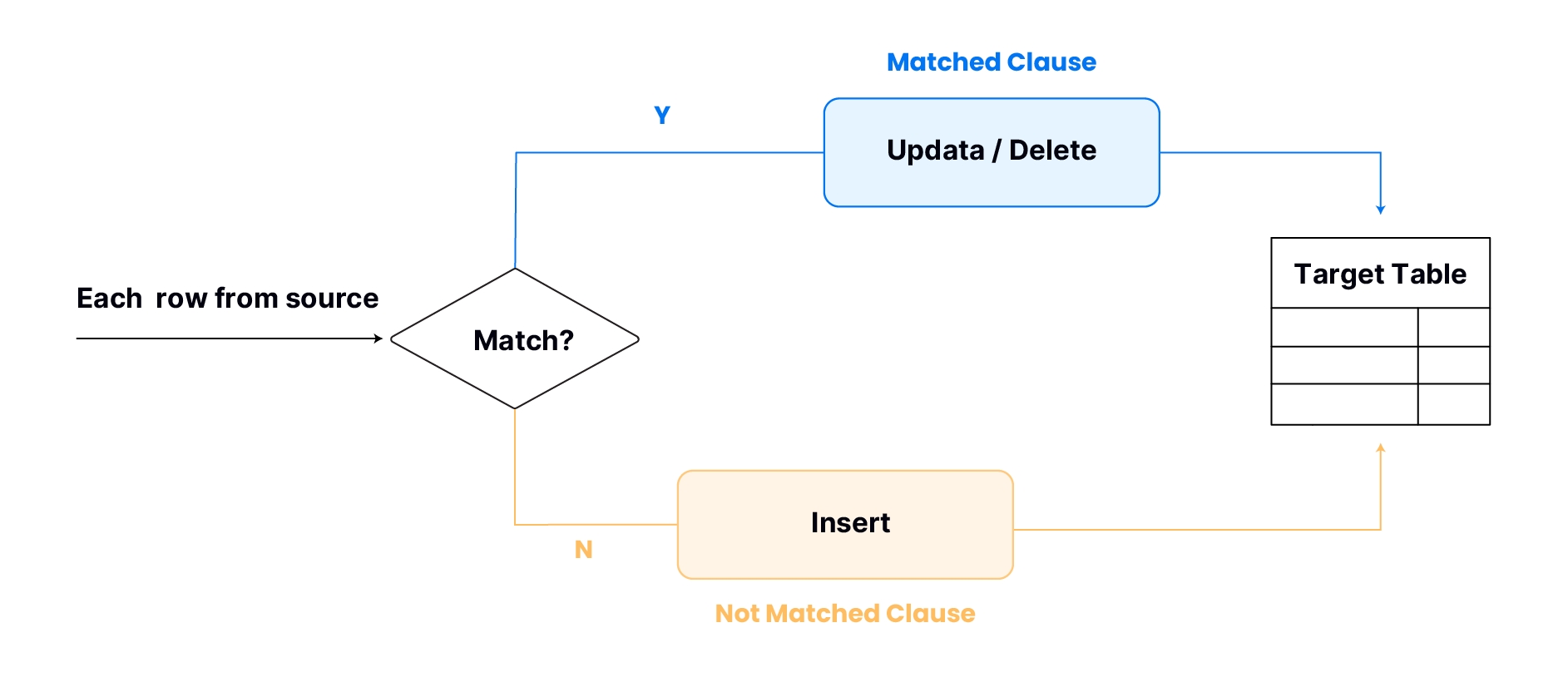
一条 MERGE 语句通常包含 MATCHED 和 / 或 NOT MATCHED 子句,用于指示 TiDB Cloud Lake 如何处理匹配和不匹配的场景。对于 MATCHED 子句,你可以选择对目标表执行 UPDATE 或 DELETE 操作。相反,对于 NOT MATCHED 子句,可用的操作是 INSERT。
多个 MATCHED 和 NOT MATCHED 子句
一条 MERGE 语句可以包含多个 MATCHED 和 / 或 NOT MATCHED 子句,使你能够根据 MERGE 操作期间满足的条件,灵活指定要执行的不同操作。
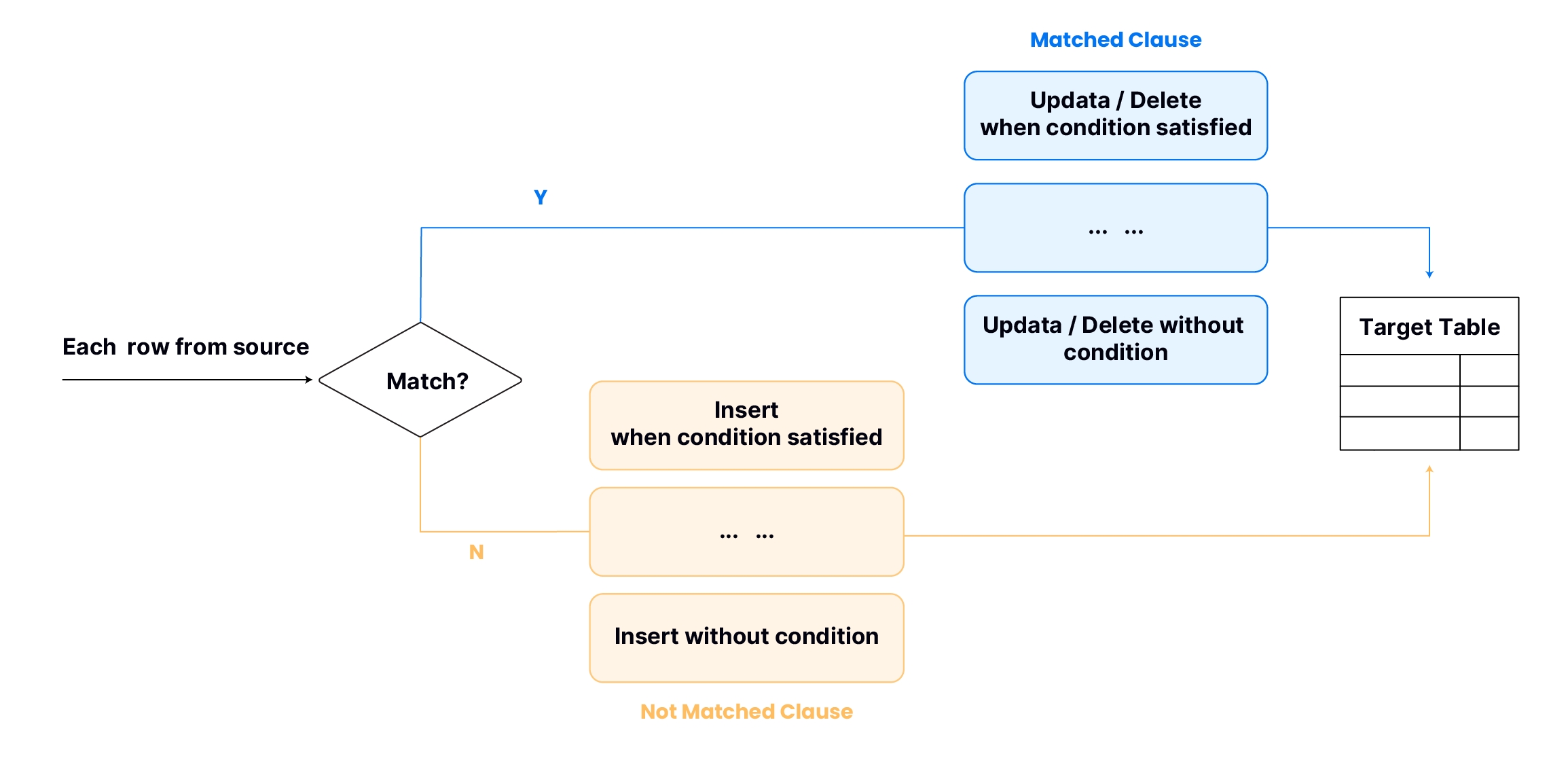
如果一条 MERGE 语句包含多个 MATCHED 子句,则除最后一个子句外,每个子句都需要指定条件。这些条件决定了执行相应操作的判定标准。TiDB Cloud Lake 会按照指定顺序对这些条件进行求值。一旦某个条件满足,就会触发对应的操作,跳过其余的 MATCHED 子句,然后继续处理来源中的下一行。如果 MERGE 语句还包含多个 NOT MATCHED 子句,TiDB Cloud Lake 也会以类似方式处理它们。
语法
MERGE INTO <target_table>
    USING (SELECT ... ) [AS] <alias> ON <join_expr> { matchedClause | notMatchedClause } [ ... ]

matchedClause ::=
  WHEN MATCHED [ AND <condition> ] THEN
  {
    UPDATE SET <col_name> = <expr> [ , <col_name2> = <expr2> ... ] |
    UPDATE * |
    DELETE  /* Removes matched rows from the target table */
  }

notMatchedClause ::=
  WHEN NOT MATCHED [ AND <condition> ] THEN
  { INSERT ( <col_name> [ , <col_name2> ... ] ) VALUES ( <expr> [ , ... ] ) | INSERT * }
输出
MERGE 会通过以下列汇总数据合并结果:
示例
示例 1:使用多个 Matched 子句进行合并
本示例使用 MERGE 将 employees 中的员工数据同步到 salaries,并根据指定条件插入或修改薪资信息。
-- Create the 'employees' table as the source for merging
CREATE TABLE employees (
    employee_id INT,
    employee_name VARCHAR(255),
    department VARCHAR(255)
);

-- Create the 'salaries' table as the target for merging
CREATE TABLE salaries (
    employee_id INT,
    salary DECIMAL(10, 2)
);

-- Insert initial employee data
INSERT INTO employees VALUES
    (1, 'Alice', 'HR'),
    (2, 'Bob', 'IT'),
    (3, 'Charlie', 'Finance'),
    (4, 'David', 'HR');

-- Insert initial salary data
INSERT INTO salaries VALUES
    (1, 50000.00),
    (2, 60000.00);

-- Enable MERGE INTO

-- Merge data into 'salaries' based on employee details from 'employees'
MERGE INTO salaries
    USING (SELECT * FROM employees) AS employees
    ON salaries.employee_id = employees.employee_id
    WHEN MATCHED AND employees.department = 'HR' THEN
        UPDATE SET
            salaries.salary = salaries.salary + 1000.00
    WHEN MATCHED THEN
        UPDATE SET
            salaries.salary = salaries.salary + 500.00
    WHEN NOT MATCHED THEN
        INSERT (employee_id, salary)
            VALUES (employees.employee_id, 55000.00);

┌──────────────────────────────────────────────────┐
│ number of rows inserted │ number of rows updated │
├─────────────────────────┼────────────────────────┤
│                      2  │                      2 │
└──────────────────────────────────────────────────┘

-- Retrieve all records from the 'salaries' table after merging
SELECT * FROM salaries;

┌────────────────────────────────────────────┐
│   employee_id   │          salary          │
├─────────────────┼──────────────────────────┤
│               3 │ 55000.00                 │
│               4 │ 55000.00                 │
│               1 │ 51000.00                 │
│               2 │ 60500.00                 │
└────────────────────────────────────────────┘
示例 2:使用 UPDATE * 和 INSERT * 进行合并
本示例使用 MERGE 在 target_table 和 source_table 之间同步数据:将匹配行修改为来源中的值,并插入不匹配的行。
-- Create the target table target_table
CREATE TABLE target_table (
    ID INT,
    Name VARCHAR(50),
    Age INT,
    City VARCHAR(50)
);

-- Insert initial data into target_table
INSERT INTO target_table (ID, Name, Age, City)
VALUES
    (1, 'Alice', 25, 'Toronto'),
    (2, 'Bob', 30, 'Vancouver'),
    (3, 'Carol', 28, 'Montreal');

-- Create the source table source_table
CREATE TABLE source_table (
    ID INT,
    Name VARCHAR(50),
    Age INT,
    City VARCHAR(50)
);

-- Insert initial data into source_table
INSERT INTO source_table (ID, Name, Age, City)
VALUES
    (1, 'David', 27, 'Calgary'),
    (2, 'Emma', 29, 'Ottawa'),
    (4, 'Frank', 32, 'Edmonton');

-- Enable MERGE INTO

-- Merge data from source_table into target_table
MERGE INTO target_table AS T
    USING (SELECT * FROM source_table) AS S
    ON T.ID = S.ID
    WHEN MATCHED THEN
        UPDATE *
    WHEN NOT MATCHED THEN
    INSERT *;

┌──────────────────────────────────────────────────┐
│ number of rows inserted │ number of rows updated │
├─────────────────────────┼────────────────────────┤
│                      1  │                      2 │
└──────────────────────────────────────────────────┘

-- Retrieve all records from the 'target_table' after merging
SELECT * FROM target_table order by ID;

┌─────────────────────────────────────────────────────────────────────────┐
│        id       │       name       │       age       │       city       │
├─────────────────┼──────────────────┼─────────────────┼──────────────────┤
│               1 │ David            │              27 │ Calgary          │
│               2 │ Emma             │              29 │ Ottawa           │
│               3 │ Carol            │              28 │ Montreal         │
│               4 │ Frank            │              32 │ Edmonton         │
└─────────────────────────────────────────────────────────────────────────┘
示例 3:结合 DELETE 操作进行合并
本示例演示如何使用 MERGE,根据源表中的特定条件删除目标表中的记录。
-- Create the customers table (target)
CREATE TABLE customers (
    customer_id INT,
    customer_name VARCHAR(50),
    status VARCHAR(20),
    last_purchase_date DATE
);

-- Insert initial customer data
INSERT INTO customers VALUES
    (101, 'John Smith', 'Active', '2023-01-15'),
    (102, 'Emma Johnson', 'Active', '2023-02-20'),
    (103, 'Michael Brown', 'Inactive', '2022-11-05'),
    (104, 'Sarah Wilson', 'Active', '2023-03-10'),
    (105, 'David Lee', 'Inactive', '2022-09-30');

-- Create the removals table (source with customers to be removed)
CREATE TABLE removals (
    customer_id INT,
    removal_reason VARCHAR(50),
    removal_date DATE
);

-- Insert data for customers to be removed
INSERT INTO removals VALUES
    (103, 'Account Closed', '2023-04-01'),
    (105, 'Customer Request', '2023-04-05');

-- Enable MERGE INTO

-- Use MERGE to delete inactive customers that appear in the removals table
MERGE INTO customers AS c
    USING removals AS r
    ON c.customer_id = r.customer_id
    WHEN MATCHED AND c.status = 'Inactive' THEN
        DELETE;

┌────────────────────────┐
│ number of rows deleted │
├────────────────────────┤
│                     2  │
└────────────────────────┘