BEGIN
开始一个新事务。BEGIN 和 COMMIT/ROLLBACK 必须配合使用,以启动事务并最终提交或回滚该事务。
TiDB Cloud Lake 不支持嵌套事务,因此不匹配的事务语句会被忽略。
BEGIN; -- Start a transaction

MERGE INTO ... -- This statement belongs to the transaction

BEGIN; -- Executing BEGIN within a transaction is ignored, no new transaction is started, no error is raised

INSERT INTO ... -- This statement also belongs to the transaction

COMMIT; -- End the transaction

INSERT INTO ... -- This statement belongs to a single-statement transaction

COMMIT; -- Executing COMMIT outside of a multi-statement transaction is ignored, no commit operation is performed, no error is raised

BEGIN; -- Start another transaction
...
当在多语句事务中执行 DDL 语句时,它会提交当前多语句事务,并将后续语句作为单语句事务执行,直到再次发出另一个 BEGIN。
BEGIN; -- Start a multi-statement transaction

-- DML statements here are part of the current transaction
INSERT INTO table_name (column1, column2) VALUES (value1, value2);

-- Executing a DDL statement within the transaction
CREATE TABLE new_table (column1 data_type, column2 data_type);
-- This will commit the current transaction

-- Subsequent statements are executed as single-statement transactions
UPDATE table_name SET column1 = value WHERE condition;

BEGIN; -- Start a new multi-statement transaction

-- New DML statements here are part of the new transaction
DELETE FROM table_name WHERE condition;

COMMIT; -- End the new transaction
语法
BEGIN [ TRANSACTION ]
事务 ID 和状态
TiDB Cloud Lake 会自动为每个事务生成一个事务 ID。该 ID 使用户能够识别哪些语句属于同一个事务,从而便于排查问题。
如果你使用的是 TiDB Cloud Lake,可以在 Monitor > SQL History 中找到事务 ID:
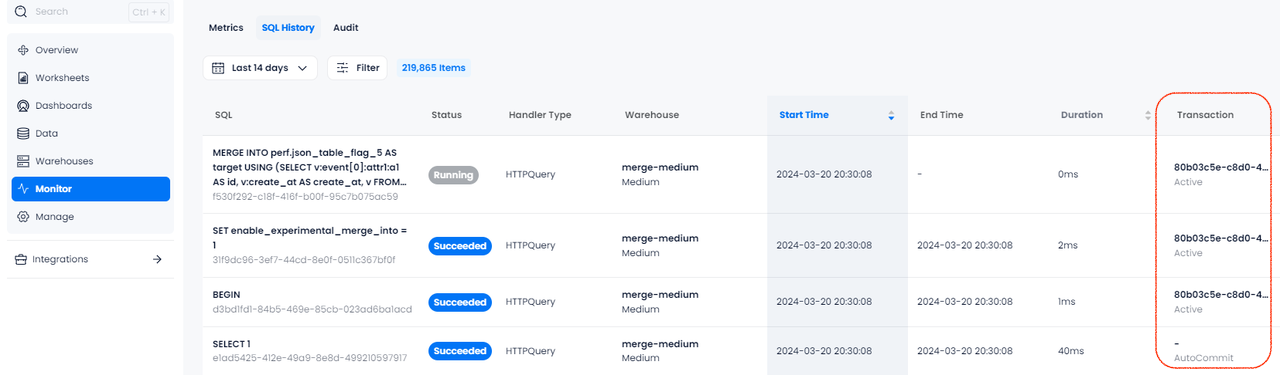
在 Transaction 列中,你还可以看到 SQL 语句执行期间的事务状态:
示例
在此示例中,三个语句(INSERT、UPDATE、DELETE)都属于同一个多语句事务。它们作为一个整体执行,并在发出 COMMIT 时一起提交修改。
-- Start by creating a table
CREATE TABLE employees (
    id INT,
    name VARCHAR(50),
    department VARCHAR(50)
);

-- Start a multi-statement transaction
BEGIN;

-- First statement in the transaction: Insert a new employee
INSERT INTO employees (id, name, department) VALUES (1, 'Alice', 'HR');

-- Second statement in the transaction: Insert another new employee
INSERT INTO employees (id, name, department) VALUES (2, 'Bob', 'Engineering');

-- Third statement in the transaction: Update the department of the first employee
UPDATE employees SET department = 'Finance' WHERE id = 1;

-- Commit all the changes
COMMIT;

-- Verify that the data in the table
SELECT * FROM employees;

┌───────────────────────────────────────────────────────┐
│        id       │       name       │    department    │
├─────────────────┼──────────────────┼──────────────────┤
│               1 │ Alice            │ Finance          │
│               2 │ Bob              │ Engineering      │
└───────────────────────────────────────────────────────┘
在此示例中,ROLLBACK 语句会撤销事务期间所做的所有修改。因此,最后的 SELECT 查询应显示一个空的 employees 表,以确认没有任何修改被提交。
-- Start by creating a table
CREATE TABLE employees (
    id INT,
    name VARCHAR(50),
    department VARCHAR(50)
);

-- Start a multi-statement transaction
BEGIN;

-- First statement in the transaction: Insert a new employee
INSERT INTO employees (id, name, department) VALUES (1, 'Alice', 'HR');

-- Second statement in the transaction: Insert another new employee
INSERT INTO employees (id, name, department) VALUES (2, 'Bob', 'Engineering');

-- Third statement in the transaction: Update the department of the first employee
UPDATE employees SET department = 'Finance' WHERE id = 1;

-- Rollback the transaction
ROLLBACK;

-- Verify that the table is empty
SELECT * FROM employees;
此示例创建了一个 stream 和一个用于消费该 stream 的 task,并使用事务块(BEGIN; COMMIT)将数据插入到两个目标表中。
CREATE DATABASE my_db;
USE my_db;

CREATE TABLE source_table (
    id INT,
    source_flag VARCHAR(50),value VARCHAR(50)
);

CREATE TABLE target_table_1 (
    id INT,value VARCHAR(50)
);

CREATE TABLE target_table_2 (
    id INT,value VARCHAR(50)
);

CREATE STREAM source_stream ON TABLE source_table;

INSERT INTO source_table VALUES
(1, 'source1', 'value1'),
(2, 'source2', 'value2'),
(3, 'source3', 'value3'),
(4, 'source4', 'value4');

CREATE TASK insert_task
WAREHOUSE = 'system'
SCHEDULE = 1 SECOND AS
BEGIN
    BEGIN;
    INSERT INTO my_db.target_table_1
    SELECT id, value
    FROM my_db.source_stream;

    INSERT INTO my_db.target_table_2
    SELECT id, value
    FROM my_db.source_stream;
    COMMIT;
END;

EXECUTE TASK insert_task;