Connect to TiDB Cloud Lake with Deepnote
Deepnote allows you to easily work on your data science projects, together in real-time and in one place with your friends and colleagues; helping you turn your ideas and analyses into products faster. Deepnote is built for the browser so you can use it across any platform (Windows, Mac, Linux or Chromebook). No downloads required, with updates shipped to you daily. All changes are instantly saved.
You can connect Deepnote to TiDB Cloud Lake by using Deepnote's ClickHouse-compatible integration with a secure connection.
Tutorial: Integrating with Deepnote
This tutorial guides you through the process of integrating TiDB Cloud Lake with Deepnote.
Step 1. Set up Environment
Make sure you can log in to your TiDB Cloud Lake account and obtain the connection information for a warehouse. For more details, see Connecting to a Warehouse.
Step 2. Connect to TiDB Cloud Lake
Sign in to Deepnote, or create an account if you don't have one.
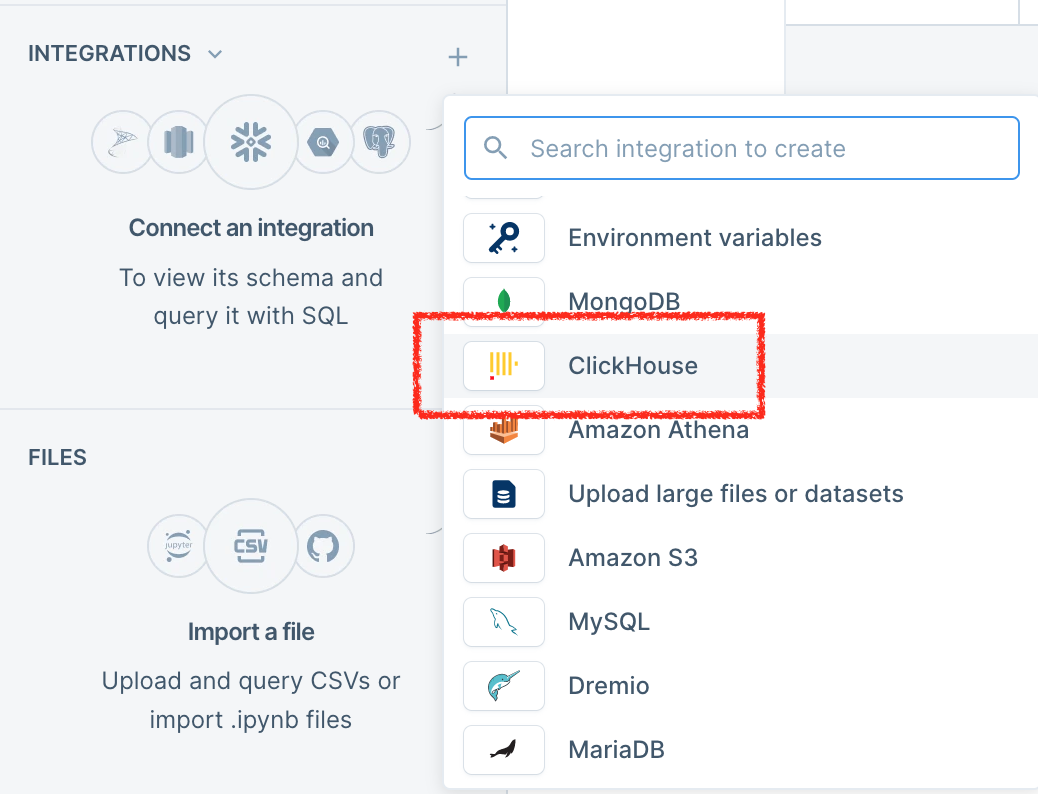
Click + to the right of INTEGRATIONS in the left sidebar, then select ClickHouse.
Complete the fields with your connection information.
Create a notebook.
In the notebook, navigate to the SQL section, and then choose the connection you previously created.
You're all set! Refer to the Deepnote documentation for how to work with the tool.