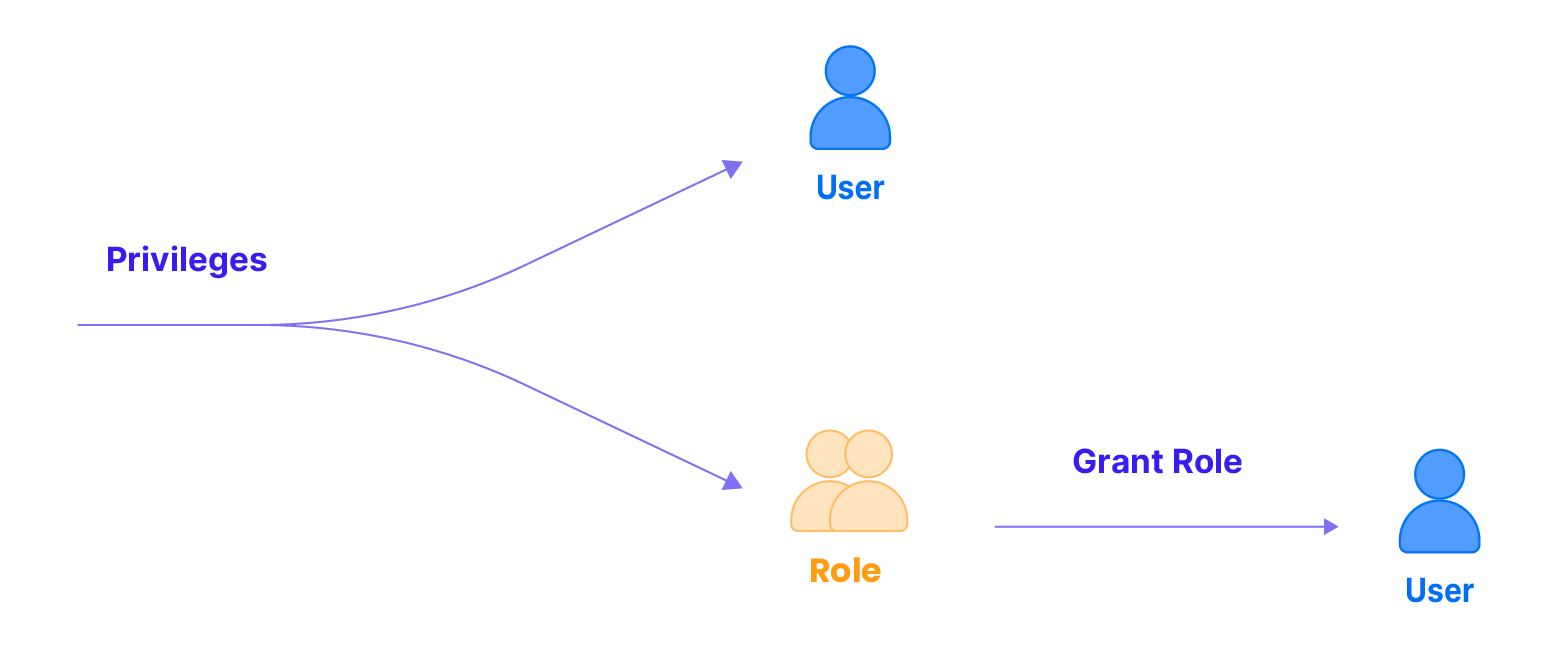
A privilege is a permission to perform an action. Users must have specific privileges to execute particular actions within TiDB Cloud Lake. For example, when querying a table, a user needs SELECT privileges to the table. Similarly, to read a dataset within a stage, the user must possess READ privileges.
In TiDB Cloud Lake, privileges are granted to roles. Users receive privileges through the roles assigned to them.
Managing Privileges
To manage privileges for a role, use the following commands:
To grant a privilege, create a role, grant the privilege to the role, and then grant that role to users who need it. In the following example, a new role named 'writer' is created and granted all privileges on objects in the 'default' schema. Subsequently, 'david' is created as a new user with the password 'abc123', and the 'writer' role is granted to 'david'. Finally, the granted privileges for 'writer' are shown.
-- Create a new role named 'writer'CREATE ROLE writer;
-- Grant all privileges on all objects in the 'default' schema to the role 'writer'GRANTALLON default.*TO ROLE writer;
-- Create a new user named 'david' with the password 'abc123' and set the default roleCREATEUSER david IDENTIFIED BY'abc123'WITH DEFAULT_ROLE ='writer';
-- Grant the role 'writer' to the user 'david'GRANT ROLE writer TO david;
-- Show the granted privileges for the role 'writer'SHOW GRANTS FOR ROLE writer;
┌───────────────────────────────────────────────────────┐
│ Grants │
├───────────────────────────────────────────────────────┤
│ GRANTALLON'default'.'default'.*TO ROLE 'writer' │
└───────────────────────────────────────────────────────┘
Revoking Privileges from Roles
In the context of access control, privileges are revoked from roles. In the following example, we revoke all privileges on all objects in the 'default' schema from role 'writer', and then we display the granted privileges for role 'writer':
-- Revoke all privileges on all objects in the 'default' schema from role 'writer'REVOKEALLON default.*FROM ROLE writer;
-- Show the granted privileges for the role 'writer'SHOW GRANTS FOR ROLE writer;
Access Control Privileges
TiDB Cloud Lake offers a range of privileges that allow you to exercise fine-grained control over your database objects. TiDB Cloud Lake privileges can be categorized into the following types:
Global privileges: This set of privileges includes privileges that apply to the entire database management system, rather than specific objects within the system. Global privileges grant actions that affect the overall functionality and administration of the database, such as creating or deleting databases, managing users and roles, and modifying system-level settings. For which privileges are included, see Global Privileges.
Object-specific privileges: Object-specific privileges come with different sets and each one applies to a specific database object. This includes:
Grants all the privileges for the specified object type.
APPLY MASKING POLICY
Global, Masking Policy
Attaches, detaches, describes, or drops masking policies. When granted on ., the grantee can manage any masking policy.
APPLY ROW ACCESS POLICY
Global, Row Access Policy
Adds or removes row access policies from tables and allows DESCRIBE/DROP operations on any policy. When granted on ., the grantee can manage every row access policy.
ALTER
Global, Database, Table, View
Alters a database, table, user or UDF.
CREATE
Global, Table
Creates a table or UDF.
CREATE DATABASE
Global
Creates a database or UDF.
CREATE WAREHOUSE
Global
Creates a warehouse.
CREATE CONNECTION
Global
Creates a connection.
CREATE SEQUENCE
Global
Creates a sequence.
CREATE PROCEDURE
PROCEDURE
Creates a procedure.
CREATE MASKING POLICY
Global
Creates a masking policy.
CREATE ROW ACCESS POLICY
Global
Creates a row access policy.
DELETE
Table
Deletes or truncates rows in a table.
DROP
Global, Database, Table, View
Drops a database, table, view or UDF. Undrops a table.
INSERT
Table
Inserts rows into a table.
SELECT
Database, Table
Selects rows from a table. Shows or uses a database.
UPDATE
Table
Updates rows in a table.
GRANT
Global
Grants / revokes privileges to / from a role.
SUPER
Global, Table
Kills a query. Sets global configs. Optimizes a table. Analyzes a table. Operates a stage(Lists stages. Creates, Drops a stage), catalog or share.
USAGE
Global
Synonym for “no privileges”.
CREATE ROLE
Global
Creates a role.
DROP ROLE
Global
Drops a role.
CREATE USER
Global
Creates a SQL user.
DROP USER
Global
Drops a SQL user.
WRITE
Stage
Write into a stage.
READ
Stage
Read a stage.
USAGE
UDF
Use udf.
ACCESS CONNECTION
CONNECTION
Access connection.
ACCESS SEQUENCE
SEQUENCE
Access sequence.
ACCESS PROCEDURE
PROCEDURE
Access procedure.
Global Privileges
Privilege
Description
ALL
Grants all the privileges for the specified object type.
ALTER
Adds or drops a table column. Alters a cluster key. Re-clusters a table.
CREATEROLE
Creates a role.
CREAT DATABASE
Creates a DATABASE.
CREATE WAREHOUSE
Creates a WAREHOUSE.
CREATE CONNECTION
Creates a CONNECTION.
DROPUSER
Drops a user.
CREATEUSER
Creates a user.
DROPROLE
Drops a role.
SUPER
Kills a query. Sets or unsets a setting. Operates a stage, catalog or share. Calls a function. COPY INTO a stage.
USAGE
Connects to TiDB Cloud Lake query only.
CREATE
Creates a UDF.
DROP
Drops a UDF.
ALTER
Alters a UDF. Alters a SQL user.
Table Privileges
Privilege
Description
ALL
Grants all the privileges for the specified object type.
ALTER
Adds or drops a table column. Alters a cluster key. Re-clusters a table.
CREATE
Creates a table.
DELETE
Deletes rows in a table. Truncates a table.
DROP
Drops or undrops a table. Restores the recent version of a dropped table.
INSERT
Inserts rows into a table. COPY INTO a table.
SELECT
Selects rows from a table. SHOW CREATE a table. DESCRIBE a table.
UPDATE
Updates rows in a table.
SUPER
Optimizes or analyzes a table.
OWNERSHIP
Grants full control over a database. Only a single role can hold this privilege on a specific object at a time.
View Privileges
Privilege
Description
ALL
Grants all the privileges for the specified object type
ALTER
Creates or drops a view. Alters the existing view using another QUERY.
DROP
Drops a view.
Database Privileges
Please note that you can use the USE DATABASE command to specify a database once you have any of the following privileges to the database or any privilege to a table in the database.
Privilege
Description
ALTER
Renames a database.
DROP
Drops or undrops a database. Restores the recent version of a dropped database.
SELECT
SHOW CREATE a database.
OWNERSHIP
Grants full control over a database. Only a single role can hold this privilege on a specific object at a time.
USAGE
Allows entering a database using USE <database>, without granting access to any contained objects.
Note:
If a role owns a database, the role can access all the tables in the database.
Session Policy Privileges
Privilege
Description
SUPER
Kills a query. Sets or unsets a setting.
ALL
Grants all the privileges for the specified object type.
Stage Privileges
Privilege
Description
WRITE
Write into a stage. For example, copy into a stage, presign upload or removes a stage
READ
Read a stage. For example, list stage, query stage, copy into table from stage, presign download
ALL
Grants READ, WRITE privileges for the specified object type.
OWNERSHIP
Grants full control over a stage. Only a single role can hold this privilege on a specific object at a time.
Note:
Don't check external location auth.
UDF Privileges
Privilege
Description
USAGE
Can use UDF. For example, copy into a stage, presign upload
ALL
Grants READ, WRITE privileges for the specified object type.
OWNERSHIP
Grants full control over a UDF. Only a single role can hold this privilege on a specific object at a time.
Note:
Don't check the udf auth if it's already be constantly folded.
Don't check the udf auth if it's a value in insert.
Catalog Privileges
Privilege
Description
SUPER
SHOW CREATE catalog. Creates or drops a catalog.
ALL
Grants all the privileges for the specified object type.
Share Privileges
Share privileges can be granted and revoked for share objects using the same SQL privilege model (GRANT/REVOKE).
Connection Privileges
Privilege
Description
Access Connection
Can access Connection.
ALL
Grants Access Connection privileges for the specified object type.
OWNERSHIP
Grants full control over a Connection. Only a single role can hold this privilege on a specific object at a time.
Sequence Privileges
Privilege
Description
Access Sequence
Can access Sequence.(e.g. Drop,Desc)
ALL
Grants Access Sequence privileges for the specified object type.
OWNERSHIP
Grants full control over a Sequence. Only a single role can hold this privilege on a specific object at a time.
Procedure Privileges
Privilege
Description
Access Procedure
Can access Procedure.(e.g. Drop,Call,Desc)
ALL
Grants Access Procedure privileges for the specified object type.
OWNERSHIP
Grants full control over a Procedure. Only a single role can hold this privilege on a specific object at a time.
Masking Policy Privileges
In addition to the global CREATE MASKING POLICY and APPLY MASKING POLICY privileges, you can grant access to individual masking policies:
Privilege
Description
APPLY
Attaches or detaches the masking policy from columns, and allows DESC/DROP operations on the policy.
OWNERSHIP
Grants full control over a masking policy. TiDB Cloud Lake grants OWNERSHIP to the role that creates the policy and revokes it automatically when the policy is dropped.
Row Access Policy Privileges
Row access policies share the same governance model. Beyond the global CREATE ROW ACCESS POLICY and APPLY ROW ACCESS POLICY privileges, grant access per policy when needed:
Privilege
Description
APPLY
Adds or removes the row access policy from tables and allows DESC/DROP operations on the policy.
OWNERSHIP
Grants full control over a row access policy. TiDB Cloud Lake grants OWNERSHIP to the creator role and revokes it automatically when the policy is dropped.