Loading from Stage
TiDB Cloud Lake enables you to easily import data from files uploaded to either the user stage or an internal/external stage. To do so, you can first upload the files to a stage using LakeSQL, and then employ the COPY INTO command to load the data from the staged file. Please note that the files must be in a format supported by TiDB Cloud Lake, otherwise the data cannot be imported. For more information on the file formats supported by TiDB Cloud Lake, see Input & Output File Formats.
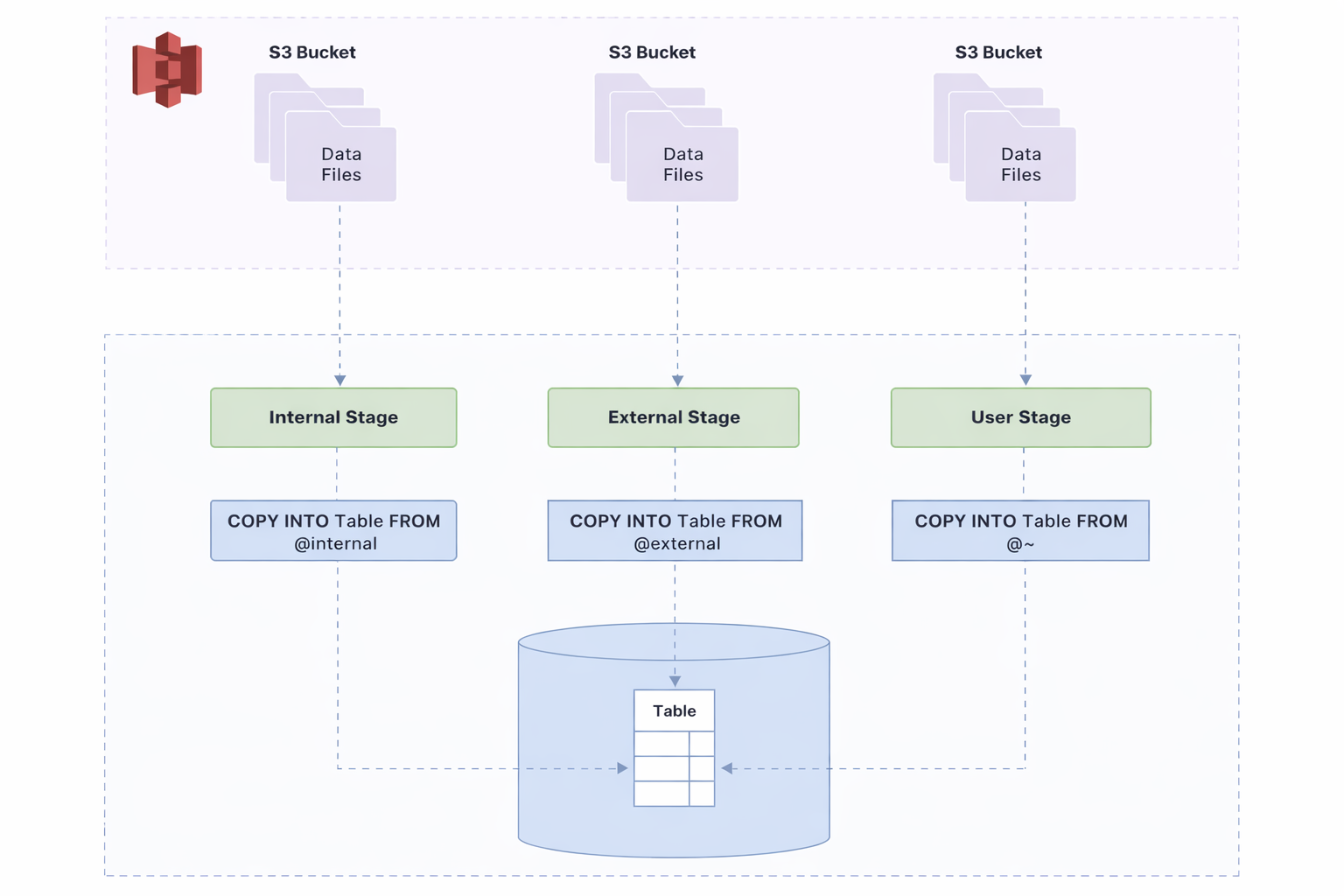
The following tutorials offer a detailed, step-by-step guide to help you effectively navigate the process of loading data from files in a stage.
Before You Begin
Before you start, make sure you have completed the following tasks:
- Download and save the sample file books.parquet to a local folder. The file contains two records:
Transaction Processing,Jim Gray,1992
Readings in Database Systems,Michael Stonebraker,2004
- Create a table with the following SQL statements in TiDB Cloud Lake:
USE default;
CREATE TABLE books
(
    title VARCHAR,
    author VARCHAR,
    date VARCHAR
);
Tutorial 1: Loading from User Stage
Follow this tutorial to upload the sample file to the user stage and load data from the staged file into TiDB Cloud Lake.
Step 1. Upload Sample File
Upload the sample file using LakeSQL:
root@localhost:8000/default> PUT fs:///Users/eric/Documents/books.parquet @~

┌───────────────────────────────────────────────┐
│                 file                │  status │
│                String               │  String │
├─────────────────────────────────────┼─────────┤
│ /Users/eric/Documents/books.parquet │ SUCCESS │
└───────────────────────────────────────────────┘
Verify the staged file:
LIST @~;

name         |size|md5                               |last_modified                |creator|
-------------+----+----------------------------------+-----------------------------+-------+
books.parquet| 998|"88432bf90aadb79073682988b39d461c"|2023-06-27 16:03:51.000 +0000|       |
Step 2. Copy Data into Table
Load data into the target table with the COPY INTO command:
COPY INTO books FROM @~ files=('books.parquet') FILE_FORMAT = (TYPE = PARQUET);Verify the loaded data:
SELECT * FROM books;

---
title                       |author             |date|
----------------------------+-------------------+----+
Transaction Processing      |Jim Gray           |1992|
Readings in Database Systems|Michael Stonebraker|2004|
Tutorial 2: Loading from Internal Stage
Follow this tutorial to upload the sample file to an internal stage and load data from the staged file into TiDB Cloud Lake.
Step 1. Create an Internal Stage
Create an internal stage with the CREATE STAGE command:
CREATE STAGE my_internal_stage;Verify the created stage:
SHOW STAGES;

╭────────────────────────────────────────────────────────────────────────────────────────────────────────────────────────────────────────────────────────────────────────────────────────────────────────────────────────────────────────────╮
│        name       │ stage_type │   storage_type   │        url       │     endpoint     │ has_credentials │   has_encryption_key  │   storage_params  │  file_format_options │      creator     │  created_on │ comment │       owner      │
│       String      │   String   │ Nullable(String) │ Nullable(String) │ Nullable(String) │     Boolean     │        Boolean        │ Nullable(Variant) │        Variant       │ Nullable(String) │  Timestamp  │  String │ Nullable(String) │
├───────────────────┼────────────┼──────────────────┼──────────────────┼──────────────────┼─────────────────┼───────────────────────┼───────────────────┼──────────────────────┼──────────────────┼─────────────┼─────────┼──────────────────┤
│ my_internal_stage │ Internal   │ NULL             │ NULL             │ NULL             │ false           │ false                 │ NULL              │ {"compression":"Zst… │ 'root'@'%'       │ 2026-06-16  │         │ account_admin    │
│                   │            │                  │                  │                  │                 │                       │                   │                      │                  │ 22:21:19…   │         │                  │
╰────────────────────────────────────────────────────────────────────────────────────────────────────────────────────────────────────────────────────────────────────────────────────────────────────────────────────────────────────────────╯
Step 2. Upload Sample File
Upload the sample file using LakeSQL:
root@localhost:8000/default> CREATE STAGE my_internal_stage;

root@localhost:8000/default> PUT fs:///Users/eric/Documents/books.parquet @my_internal_stage

┌───────────────────────────────────────────────┐
│                 file                │  status │
│                String               │  String │
├─────────────────────────────────────┼─────────┤
│ /Users/eric/Documents/books.parquet │ SUCCESS │
└───────────────────────────────────────────────┘
Verify the staged file:
LIST @my_internal_stage;

name                               |size  |md5                               |last_modified                |creator|
-----------------------------------+------+----------------------------------+-----------------------------+-------+
books.parquet                      |   998|"88432bf90aadb79073682988b39d461c"|2023-06-28 02:32:15.000 +0000|       |
Step 3. Copy Data into Table
Load data into the target table with the COPY INTO command:
COPY INTO books
FROM @my_internal_stage
FILES = ('books.parquet')
FILE_FORMAT = (
    TYPE = 'PARQUET'
);
Verify the loaded data:
SELECT * FROM books;

---
title                       |author             |date|
----------------------------+-------------------+----+
Transaction Processing      |Jim Gray           |1992|
Readings in Database Systems|Michael Stonebraker|2004|
Tutorial 3: Loading from External Stage
Follow this tutorial to upload the sample file to an external stage and load data from the staged file into TiDB Cloud Lake.
Step 1. Create an External Stage
Create an external stage with the CREATE STAGE command:
CREATE STAGE my_external_stage
    URL = 's3://lake'
    CONNECTION = (
        ENDPOINT_URL = 'http://127.0.0.1:9000',
        ACCESS_KEY_ID = 'ROOTUSER',
        SECRET_ACCESS_KEY = 'CHANGEME123'
    );
Verify the created stage:
SHOW STAGES;

name             |stage_type|creator           |comment|
-----------------+----------+------------------+-------+
my_external_stage|External  |'root'@'%'|       |
Step 2. Upload Sample File
Upload the sample file using LakeSQL:
root@localhost:8000/default> PUT fs:///Users/eric/Documents/books.parquet @my_external_stage

┌───────────────────────────────────────────────┐
│                 file                │  status │
│                String               │  String │
├─────────────────────────────────────┼─────────┤
│ /Users/eric/Documents/books.parquet │ SUCCESS │
└───────────────────────────────────────────────┘
Verify the staged file:
LIST @my_external_stage;

name         |size|md5                               |last_modified                |creator|
-------------+----+----------------------------------+-----------------------------+-------+
books.parquet| 998|"88432bf90aadb79073682988b39d461c"|2023-06-28 04:13:15.178 +0000|       |
Step 3. Copy Data into Table
Load data into the target table with the COPY INTO command:
COPY INTO books
FROM @my_external_stage
FILES = ('books.parquet')
FILE_FORMAT = (
    TYPE = 'PARQUET'
);
Verify the loaded data:
SELECT * FROM books;

---
title                       |author             |date|
----------------------------+-------------------+----+
Transaction Processing      |Jim Gray           |1992|
Readings in Database Systems|Michael Stonebraker|2004|