COPY INTO <table>
COPY INTO allows you to load data from files located in one of the following locations:
- User / Internal / External stages: See What is Stage? to learn about stages in TiDB Cloud Lake.
- Buckets or containers created in a storage service.
- Remote servers from where you can access the files by their URL (starting with
https://). - IPFS and Hugging Face repositories.
See also: COPY INTO <location>
Syntax
/* Standard data load */
COPY INTO [<database_name>.]<table_name> [ ( <col_name> [ , <col_name> ... ] ) ]
     FROM { userStage | internalStage | externalStage | externalLocation }
[ FILES = ( '<file_name>' [ , '<file_name>' ] [ , ... ] ) ]
[ PATTERN = '<regex_pattern>' ]
[ FILE_FORMAT = (
         FORMAT_NAME = '<your-custom-format>'
         | TYPE = { CSV | TSV | NDJSON | PARQUET | ORC | AVRO } [ formatTypeOptions ]
       ) ]
[ copyOptions ]

/* Data load with transformation */
COPY INTO [<database_name>.]<table_name> [ ( <col_name> [ , <col_name> ... ] ) ]
     FROM (
        SELECT {
            [<alias>.]<column> [, [<alias>.]<column> ...] -- Query columns by name
            | [<alias>.]$<col_position> [, [<alias>.]$<col_position> ...] -- Query columns by position
            | [<alias>.]$1[:<column>] [, [<alias>.]$1[:<column>]  ...] -- Query rows as Variants
            } ]
        FROM {@<stage_name>[/<path>] | '<uri>'}
    )
[ FILES = ( '<file_name>' [ , '<file_name>' ] [ , ... ] ) ]
[ PATTERN = '<regex_pattern>' ]
[ FILE_FORMAT = (
         FORMAT_NAME = '<your-custom-format>'
         | TYPE = { CSV | TSV | NDJSON | PARQUET | ORC | AVRO } [ formatTypeOptions ]
       ) ]
[ copyOptions ]
Where:
userStage ::= @~[/<path>]

internalStage ::= @<internal_stage_name>[/<path>]

externalStage ::= @<external_stage_name>[/<path>]

externalLocation ::=
  /* Amazon S3-like Storage */
  's3://<bucket>[/<path>]'
  CONNECTION = (
    [ CONNECTION_NAME = '<connection-name>' ]
    | [ ENDPOINT_URL = '<endpoint-url>' ]
    [ ACCESS_KEY_ID = '<your-access-key-ID>' ]
    [ SECRET_ACCESS_KEY = '<your-secret-access-key>' ]
    [ ENABLE_VIRTUAL_HOST_STYLE = TRUE | FALSE ]
    [ MASTER_KEY = '<your-master-key>' ]
    [ REGION = '<region>' ]
    [ SECURITY_TOKEN = '<security-token>' ]
    [ ROLE_ARN = '<role-arn>' ]
    [ EXTERNAL_ID = '<external-id>' ]
  )

  /* Azure Blob Storage */
  | 'azblob://<container>[/<path>]'
    CONNECTION = (
      [ CONNECTION_NAME = '<connection-name>' ]
      | ENDPOINT_URL = '<endpoint-url>'
      ACCOUNT_NAME = '<account-name>'
      ACCOUNT_KEY = '<account-key>'
    )

  /* Google Cloud Storage */
  | 'gcs://<bucket>[/<path>]'
    CONNECTION = (
      [ CONNECTION_NAME = '<connection-name>' ]
      | CREDENTIAL = '<your-base64-encoded-credential>'
    )

  /* Alibaba Cloud OSS */
  | 'oss://<bucket>[/<path>]'
    CONNECTION = (
      [ CONNECTION_NAME = '<connection-name>' ]
      | ACCESS_KEY_ID = '<your-ak>'
      ACCESS_KEY_SECRET = '<your-sk>'
      ENDPOINT_URL = '<endpoint-url>'
      [ PRESIGN_ENDPOINT_URL = '<presign-endpoint-url>' ]
    )

  /* Tencent Cloud Object Storage */
  | 'cos://<bucket>[/<path>]'
    CONNECTION = (
      [ CONNECTION_NAME = '<connection-name>' ]
      | SECRET_ID = '<your-secret-id>'
      SECRET_KEY = '<your-secret-key>'
      ENDPOINT_URL = '<endpoint-url>'
    )

  /* Remote Files */
  | 'https://<url>'

  /* IPFS */
  | 'ipfs://<your-ipfs-hash>'
    CONNECTION = (ENDPOINT_URL = 'https://<your-ipfs-gateway>')

  /* Hugging Face */
  | 'hf://<repo-id>[/<path>]'
    CONNECTION = (
      [ REPO_TYPE = 'dataset' | 'model' ]
      [ REVISION = '<revision>' ]
      [ TOKEN = '<your-api-token>' ]
    )

formatTypeOptions ::=
  /* Common options for all formats */
  [ COMPRESSION = AUTO | GZIP | BZ2 | BROTLI | ZSTD | DEFLATE | RAW_DEFLATE | XZ | NONE ]

  /* CSV specific options */
  [ RECORD_DELIMITER = '<character>' ]
  [ FIELD_DELIMITER = '<character>' ]
  [ SKIP_HEADER = <integer> ]
  [ QUOTE = '<character>' ]
  [ ESCAPE = '<character>' ]
  [ NAN_DISPLAY = '<string>' ]
  [ NULL_DISPLAY = '<string>' ]
  [ ERROR_ON_COLUMN_COUNT_MISMATCH = TRUE | FALSE ]
  [ EMPTY_FIELD_AS = null | string | field_default ]
  [ BINARY_FORMAT = HEX | BASE64 ]
  [ TRIM_SPACE = TRUE | FALSE ]
  [ ENCODING = '<encoding_label>' ]
  [ ENCODING_ERROR_MODE = STRICT | REPLACE ]

  /* TSV specific options */
  [ RECORD_DELIMITER = '<character>' ]
  [ FIELD_DELIMITER = '<character>' ]
  [ TRIM_SPACE = TRUE | FALSE ]
  [ ENCODING = '<encoding_label>' ]
  [ ENCODING_ERROR_MODE = STRICT | REPLACE ]

  /* NDJSON specific options */
  [ NULL_FIELD_AS = NULL | FIELD_DEFAULT ]
  [ MISSING_FIELD_AS = ERROR | NULL | FIELD_DEFAULT ]
  [ NULL_IF = ('value1', 'value2', ...) ]

  /* PARQUET specific options */
  [ MISSING_FIELD_AS = ERROR | FIELD_DEFAULT ]
  [ NULL_IF = ('value1', 'value2', ...) ]
  [ USE_LOGIC_TYPE = TRUE | FALSE ]

  /* ORC specific options */
  [ MISSING_FIELD_AS = ERROR | FIELD_DEFAULT ]

  /* AVRO specific options */
  [ MISSING_FIELD_AS = ERROR | FIELD_DEFAULT ]
  [ NULL_IF = ('value1', 'value2', ...) ]
  [ USE_LOGIC_TYPE = TRUE | FALSE ]

copyOptions ::=
  [ PURGE = <bool> ]
  [ FORCE = <bool> ]
  [ DISABLE_VARIANT_CHECK = <bool> ]
  [ ON_ERROR = { continue | abort | abort_N } ]
  [ MAX_FILES = <num> ]
  [ RETURN_FAILED_ONLY = <bool> ]
  [ COLUMN_MATCH_MODE = { case-sensitive | case-insensitive } ]
  [ SCHEMA_EVOLUTION = (
      [ SAMPLE_FILES = AUTO | <positive_integer> ]
      [ , SAMPLE_RECORDS_PER_FILE = AUTO | <positive_integer> ]
      [ , SAMPLE_TOTAL_RECORDS = AUTO | <positive_integer> ]
    ) ]
Key Parameters
FILES: Specifies one or more file names (separated by commas) to be loaded.
PATTERN: A PCRE2-based regular expression pattern string that specifies file names to match. When loading from a stage, the pattern matches the part of the file path after
@<stage_name>[/<path>]. See Filtering Staged Files with PATTERN and Example 4: Filtering Files with Pattern.
Format Type Options
The FILE_FORMAT parameter supports different file types, each with specific formatting options. The following are the available options for each supported file format. For full details on all options, see Input & Output File Formats.
These options are available for all file formats:
Copy Options
SCHEMA_EVOLUTION Options
SCHEMA_EVOLUTION controls how TiDB Cloud Lake samples staged NDJSON files before loading. Use it with FILE_FORMAT = (TYPE = NDJSON ...) when the target table has ENABLE_SCHEMA_EVOLUTION = true.
When schema evolution inference runs for a stage or location load, the role that runs COPY INTO <table> must have both INSERT and ALTER privileges on the target table. Query-based COPY, such as COPY INTO <table> FROM (SELECT ... FROM @stage), keeps the existing privilege requirements.
If SCHEMA_EVOLUTION is omitted, TiDB Cloud Lake uses AUTO for all three sampling options. The current AUTO behavior samples up to 64 files, 1,000 records per file, and 10,000 records in total. These internal defaults may change in future versions. If your load is sensitive to the sampling strategy, set SAMPLE_FILES, SAMPLE_RECORDS_PER_FILE, and SAMPLE_TOTAL_RECORDS explicitly. If the sample misses a column that appears later during loading, COPY fails and reports the extra column names so you can increase the sampling values.
Output
COPY INTO provides a summary of the data loading results with these columns:
If RETURN_FAILED_ONLY is set to true, the output will only contain the files that failed to load.
Examples
For external storage sources, it's recommended to use pre-created connections with the CONNECTION_NAME parameter instead of specifying credentials directly in the COPY statement. This approach provides better security, maintainability, and reusability. See CREATE CONNECTION for details on creating connections.
Example 1: Loading from Stages
These examples showcase data loading into TiDB Cloud Lake from various types of stages:
COPY INTO mytable
    FROM @~
    PATTERN = '.*[.]parquet'
    FILE_FORMAT = (TYPE = PARQUET);
COPY INTO mytable
    FROM @my_internal_stage
    PATTERN = '.*[.]parquet'
    FILE_FORMAT = (TYPE = PARQUET);
COPY INTO mytable
    FROM @my_external_stage
    PATTERN = '.*[.]parquet'
    FILE_FORMAT = (TYPE = PARQUET);
Example 2: Loading from External Locations
These examples showcase data loading into TiDB Cloud Lake from various types of external sources:
This example uses a pre-created connection to load data from Amazon S3:
-- First create a connection (you only need to do this once)
CREATE CONNECTION my_s3_conn
    STORAGE_TYPE = 's3'
    ACCESS_KEY_ID = '<your-access-key-ID>'
    SECRET_ACCESS_KEY = '<your-secret-access-key>';

-- Use the connection to load data
COPY INTO mytable
    FROM 's3://mybucket/data.csv'
    CONNECTION = (CONNECTION_NAME = 'my_s3_conn')
    FILE_FORMAT = (
        TYPE = CSV,
        FIELD_DELIMITER = ',',
        RECORD_DELIMITER = '\n',
        SKIP_HEADER = 1
    );
Using IAM Role (Recommended for Production)
-- Create connection using IAM role (more secure, recommended for production)
CREATE CONNECTION my_iam_conn
    STORAGE_TYPE = 's3'
    ROLE_ARN = 'arn:aws:iam::123456789012:role/my_iam_role';

-- Load CSV files using the IAM role connection
COPY INTO mytable
    FROM 's3://mybucket/'
    CONNECTION = (CONNECTION_NAME = 'my_iam_conn')
    PATTERN = '.*[.]csv'
    FILE_FORMAT = (
        TYPE = CSV,
        FIELD_DELIMITER = ',',
        RECORD_DELIMITER = '\n',
        SKIP_HEADER = 1
    );
This example connects to Azure Blob Storage and loads data from 'data.csv' into TiDB Cloud Lake:
-- Create connection for Azure Blob Storage
CREATE CONNECTION my_azure_conn
    STORAGE_TYPE = 'azblob'
    ENDPOINT_URL = 'https://<account_name>.blob.core.windows.net'
    ACCOUNT_NAME = '<account_name>'
    ACCOUNT_KEY = '<account_key>';

-- Use the connection to load data
COPY INTO mytable
    FROM 'azblob://mybucket/data.csv'
    CONNECTION = (CONNECTION_NAME = 'my_azure_conn')
    FILE_FORMAT = (type = CSV);
This example connects to Google Cloud Storage and loads data:
-- Create connection for Google Cloud Storage
CREATE CONNECTION my_gcs_conn
    STORAGE_TYPE = 'gcs'
    CREDENTIAL = '<your-base64-encoded-credential>';

-- Use the connection to load data
COPY INTO mytable
    FROM 'gcs://mybucket/data.csv'
    CONNECTION = (CONNECTION_NAME = 'my_gcs_conn')
    FILE_FORMAT = (
        TYPE = CSV,
        FIELD_DELIMITER = ',',
        RECORD_DELIMITER = '\n',
        SKIP_HEADER = 1
    );
This example loads data from three remote CSV files and skips a file in case of errors.
COPY INTO mytable
    FROM 'https://lakesql-bin.tidbcloud.com/datasets/ontime_200{6,7,8}_200.csv'
    FILE_FORMAT = (type = CSV)
    ON_ERROR = continue;
This example loads data from a CSV file on IPFS:
COPY INTO mytable
    FROM 'ipfs://<your-ipfs-hash>'
    CONNECTION = (
        ENDPOINT_URL = 'https://<your-ipfs-gateway>'
    )
    FILE_FORMAT = (
        TYPE = CSV,
        FIELD_DELIMITER = ',',
        RECORD_DELIMITER = '\n',
        SKIP_HEADER = 1
    );
Example 3: Loading Compressed Data
This example loads a GZIP-compressed CSV file on Amazon S3 into TiDB Cloud Lake:
-- Create connection for compressed data loading
CREATE CONNECTION compressed_s3_conn
    STORAGE_TYPE = 's3'
    ACCESS_KEY_ID = '<your-access-key-ID>'
    SECRET_ACCESS_KEY = '<your-secret-access-key>';

-- Load GZIP-compressed CSV file using the connection
COPY INTO mytable
    FROM 's3://mybucket/data.csv.gz'
    CONNECTION = (CONNECTION_NAME = 'compressed_s3_conn')
    FILE_FORMAT = (
        TYPE = CSV,
        FIELD_DELIMITER = ',',
        RECORD_DELIMITER = '\n',
        SKIP_HEADER = 1,
        COMPRESSION = AUTO
    );
Example 4: Filtering Files with Pattern
This example demonstrates how to load CSV files from Amazon S3 using pattern matching with the PATTERN parameter. It filters files with 'sales' in their names and '.csv' extensions:
-- Create connection for pattern-based file loading
CREATE CONNECTION pattern_s3_conn
    STORAGE_TYPE = 's3'
    ACCESS_KEY_ID = '<your-access-key-ID>'
    SECRET_ACCESS_KEY = '<your-secret-access-key>';

-- Load CSV files with 'sales' in their names using pattern matching
COPY INTO mytable
    FROM 's3://mybucket/'
    CONNECTION = (CONNECTION_NAME = 'pattern_s3_conn')
    PATTERN = '.*sales.*[.]csv'
    FILE_FORMAT = (
        TYPE = CSV,
        FIELD_DELIMITER = ',',
        RECORD_DELIMITER = '\n',
        SKIP_HEADER = 1
    );
Where .* is interpreted as zero or more occurrences of any character. The square brackets escape the period character . that precedes a file extension.
To load from all the CSV files using a connection:
COPY INTO mytable
    FROM 's3://mybucket/'
    CONNECTION = (CONNECTION_NAME = 'pattern_s3_conn')
    PATTERN = '.*[.]csv'
    FILE_FORMAT = (
        TYPE = CSV,
        FIELD_DELIMITER = ',',
        RECORD_DELIMITER = '\n',
        SKIP_HEADER = 1
    );
When specifying the pattern for staged files in paths with multiple folders, remember that the pattern matches only the path portion after @<stage_name>[/<path>]. For example, with FROM @sales_stage/raw/, the file @sales_stage/raw/year=2025/month=01/sales_20250101.parquet is matched as year=2025/month=01/sales_20250101.parquet.
If you want to match a specific subpath following a prefix, include the prefix in the pattern (e.g., 'year=2025/month=01/') and then specify the pattern you want to match within that subpath (e.g., 'sales_').
-- File path: raw/year=2025/month=01/sales_20250101.parquet
COPY INTO ... FROM @sales_stage/raw/ PATTERN = 'year=2025/month=01/.*sales_.*[.]parquet') ...
If you want to match any part of the file path that contains the desired pattern, use '.' before and after the pattern (e.g., '.sales_20250101.*') to match any occurrences of 'sales_20250101' within the path.
-- File path: raw/year=2025/month=01/sales_20250101.parquet
COPY INTO ... FROM @sales_stage/raw/ PATTERN = '.*sales_20250101.*') ...
Example 5: Loading to Table with Extra Columns
This section demonstrates data loading into a table with extra columns, using the sample file books.csv:
Transaction Processing,Jim Gray,1992
Readings in Database Systems,Michael Stonebraker,2004
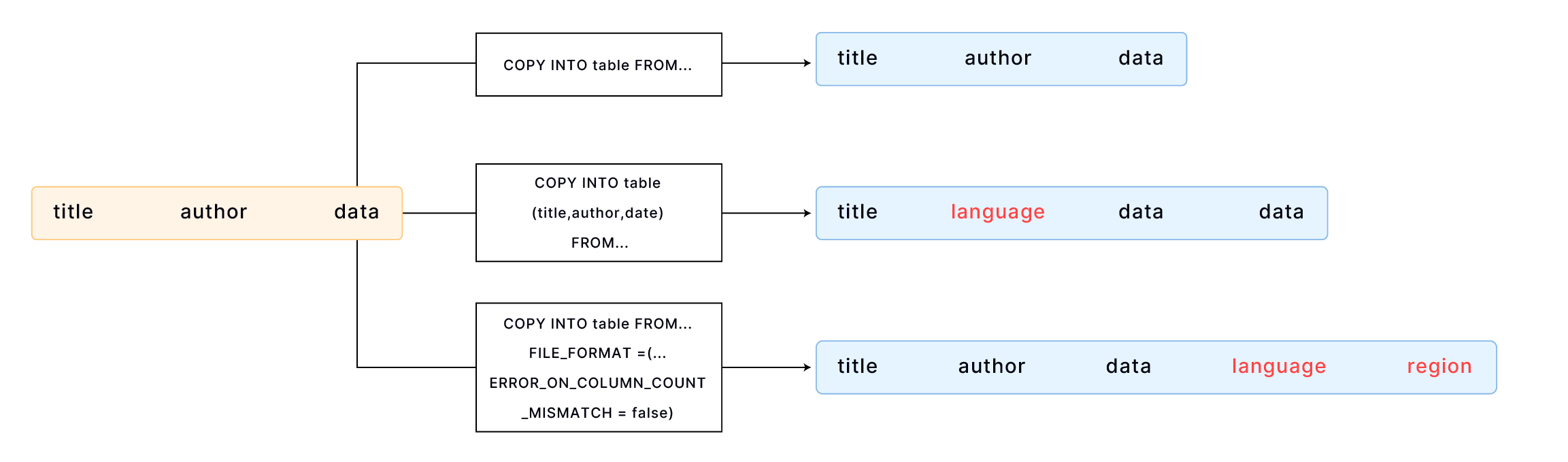
By default, COPY INTO loads data into a table by matching the order of fields in the file to the corresponding columns in the table. It's essential to ensure that the data aligns correctly between the file and the table. For example,
CREATE TABLE books
(
    title VARCHAR,
    author VARCHAR,
    date VARCHAR
);

COPY INTO books
    FROM 'https://lakesql-bin.tidbcloud.com/datasets/books.csv'
    FILE_FORMAT = (TYPE = CSV);
If your table has more columns than the file, you can specify the columns into which you want to load data. For example,
CREATE TABLE books_with_language
(
    title VARCHAR,
    language VARCHAR,
    author VARCHAR,
    date VARCHAR
);

COPY INTO books_with_language (title, author, date)
    FROM 'https://lakesql-bin.tidbcloud.com/datasets/books.csv'
    FILE_FORMAT = (TYPE = CSV);
If your table has more columns than the file, and the additional columns are at the end of the table, you can load data using the FILE_FORMAT option ERROR_ON_COLUMN_COUNT_MISMATCH. This allows you to load data without specifying each column individually. Please note that ERROR_ON_COLUMN_COUNT_MISMATCH currently works for the CSV file format.
CREATE TABLE books_with_extra_columns
(
    title VARCHAR,
    author VARCHAR,
    date VARCHAR,
    language VARCHAR,
    region VARCHAR
);

COPY INTO books_with_extra_columns
    FROM 'https://lakesql-bin.tidbcloud.com/datasets/books.csv'
    FILE_FORMAT = (TYPE = CSV, ERROR_ON_COLUMN_COUNT_MISMATCH = false);
Example 6: Loading JSON with Custom Format
This example loads data from a CSV file "data.csv" with the following content:
1,"U00010","{\"carPriceList\":[{\"carTypeId":10,\"distance":5860},{\"carTypeId":11,\"distance\":5861}]}"
2,"U00011","{\"carPriceList\":[{\"carTypeId":12,\"distance":5862},{\"carTypeId":13,\"distance\":5863}]}"
Each line contains three columns of data, with the third column being a string containing JSON data. To load CSV data correctly with JSON fields, we need to set the correct escape character. This example uses the backslash \ as the escape character, as the JSON data contains double quotes ".
Step 1: Create custom file format
-- Define a custom CSV file format with the escape character set to backslash \
CREATE FILE FORMAT my_csv_format
    TYPE = CSV
    ESCAPE = '\\';
Step 2: Create target table
CREATE TABLE t
  (
     id       INT,
     seq      VARCHAR,
     p_detail VARCHAR
  );
Step 3: Load with custom file format
COPY INTO t FROM @t_stage FILES=('data.csv')
FILE_FORMAT=(FORMAT_NAME='my_csv_format');
Example 7: Loading Invalid JSON
When loading data into a Variant column, TiDB Cloud Lake automatically checks the data's validity and throws an error in case of any invalid data. For example, if you have a Parquet file named invalid_json_string.parquet in the user stage that contains invalid JSON data, like this:
SELECT *
FROM @~/invalid_json_string.parquet;

┌────────────────────────────────────┐
│        a        │         b        │
├─────────────────┼──────────────────┤
│               5 │ {"k":"v"}        │
│               6 │ [1,              │
└────────────────────────────────────┘

DESC t2;

┌──────────────────────────────────────────────┐
│  Field │   Type  │  Null  │ Default │  Extra │
├────────┼─────────┼────────┼─────────┼────────┤
│ a      │ VARCHAR │ YES    │ NULL    │        │
│ b      │ VARIANT │ YES    │ NULL    │        │
└──────────────────────────────────────────────┘
An error would occur when attempting to load the data into a table:
COPY INTO t2 FROM @~/invalid_json_string.parquet FILE_FORMAT = (TYPE = PARQUET) ON_ERROR = CONTINUE;
error: APIError: ResponseError with 1006: EOF while parsing a value, pos 3 while evaluating function `parse_json('[1,')`
To load without checking the JSON validity, set the option DISABLE_VARIANT_CHECK to true in the COPY INTO statement:
COPY INTO t2 FROM @~/invalid_json_string.parquet
FILE_FORMAT = (TYPE = PARQUET)
DISABLE_VARIANT_CHECK = true
ON_ERROR = CONTINUE;

┌───────────────────────────────────────────────────────────────────────────────────────────────┐
│             File            │ Rows_loaded │ Errors_seen │    First_error   │ First_error_line │
├─────────────────────────────┼─────────────┼─────────────┼──────────────────┼──────────────────┤
│ invalid_json_string.parquet │           2 │           0 │ NULL             │             NULL │
└───────────────────────────────────────────────────────────────────────────────────────────────┘

SELECT * FROM t2;
-- Invalid JSON is stored as null in the Variant column.
┌──────────────────────────────────────┐
│         a        │         b         │
├──────────────────┼───────────────────┤
│ 5                │ {"k":"v"}         │
│ 6                │ null              │
└──────────────────────────────────────┘
Example 8: Loading with Schema Evolution
When loading Parquet or NDJSON files whose schemas contain columns not present in the target table, you can use schema evolution to automatically add the missing columns. For stage or location loads that run schema evolution inference, make sure the loading role has INSERT and ALTER privileges on the target table. First, enable schema evolution on the table:
CREATE OR REPLACE TABLE invoices(order_id INT);

-- Enable schema evolution
ALTER TABLE invoices SET OPTIONS(ENABLE_SCHEMA_EVOLUTION = true);
Parquet
Then load Parquet files with different schemas. TiDB Cloud Lake automatically adds new columns and fills missing values with NULL:
-- Assume @my_stage contains Parquet files with extra columns (e.g., amount, currency)
COPY INTO invoices
    FROM @my_stage/
    FILE_FORMAT = (TYPE = PARQUET MISSING_FIELD_AS = FIELD_DEFAULT);
NDJSON
For NDJSON, COPY INTO uses default sampling values to infer missing columns. Add SCHEMA_EVOLUTION only when you want to override how TiDB Cloud Lake samples staged files:
CREATE OR REPLACE TABLE events(id INT);
ALTER TABLE events SET OPTIONS(ENABLE_SCHEMA_EVOLUTION = true);

-- Assume @events_stage contains NDJSON records such as:
-- {"id":1,"city":"SF","score":9}
COPY INTO events
    FROM @events_stage/
    FILE_FORMAT = (TYPE = NDJSON MISSING_FIELD_AS = FIELD_DEFAULT)
    SCHEMA_EVOLUTION = (
        SAMPLE_FILES = AUTO,
        SAMPLE_RECORDS_PER_FILE = AUTO,
        SAMPLE_TOTAL_RECORDS = AUTO
    );
TiDB Cloud Lake samples the staged NDJSON files, appends inferred fields such as city and score as nullable columns, and then loads the data.
For more details, see Schema Evolution.