Connect to TiDB Cloud Premium via Alibaba Cloud Private Endpoint
This document describes how to connect to your TiDB Cloud Premium instance via a private endpoint on Alibaba Cloud. Connecting through a private endpoint enables secure and private communication between your services and your TiDB Cloud Premium instance without using the public internet.
Restrictions
- Currently, TiDB Premium supports private endpoint connections when the endpoint service is hosted on AWS or Alibaba Cloud. If the service is hosted on another cloud provider, the private endpoint is not applicable.
- Cross-region private endpoint connections are not supported.
Set up a private endpoint with Alibaba Cloud
To connect to your Premium instance via a private endpoint, perform the following steps.
Step 1. Choose a TiDB Cloud Premium instance
- On the My TiDB page, click the name of your target TiDB Cloud Premium instance to go to its overview page.
- Click Connect in the upper-right corner. A connection dialog is displayed.
- In the Connection Type drop-down list, select Private Endpoint.
- Take a note of Service Name, Availability Zone ID, and Region ID.
Step 2. Create a private endpoint on Alibaba Cloud
To use the Alibaba Cloud Management Console to create a VPC interface endpoint, perform the following steps:
- Sign in to the Alibaba Cloud Management Console.
- Navigate to VPC > Endpoints.
- Click the Interface Endpoints tab, and then click Create Endpoint.
- Fill in the endpoint details:
- Region: select the same region as your TiDB Cloud Premium instance.
- Endpoint Name: enter a name for the endpoint.
- Endpoint Type: choose Interface Endpoint.
- Endpoint Service: select Other Endpoint Services.
- In the Endpoint Service Name field, paste the service name you copied from TiDB Cloud.
- Click Verify. A green check mark indicates that the service is valid.
- Choose the VPC, Security Group, and Zone to associate with the endpoint.
- Click OK to create the endpoint.
- Wait until the endpoint status is Active and the connection status is Connected.
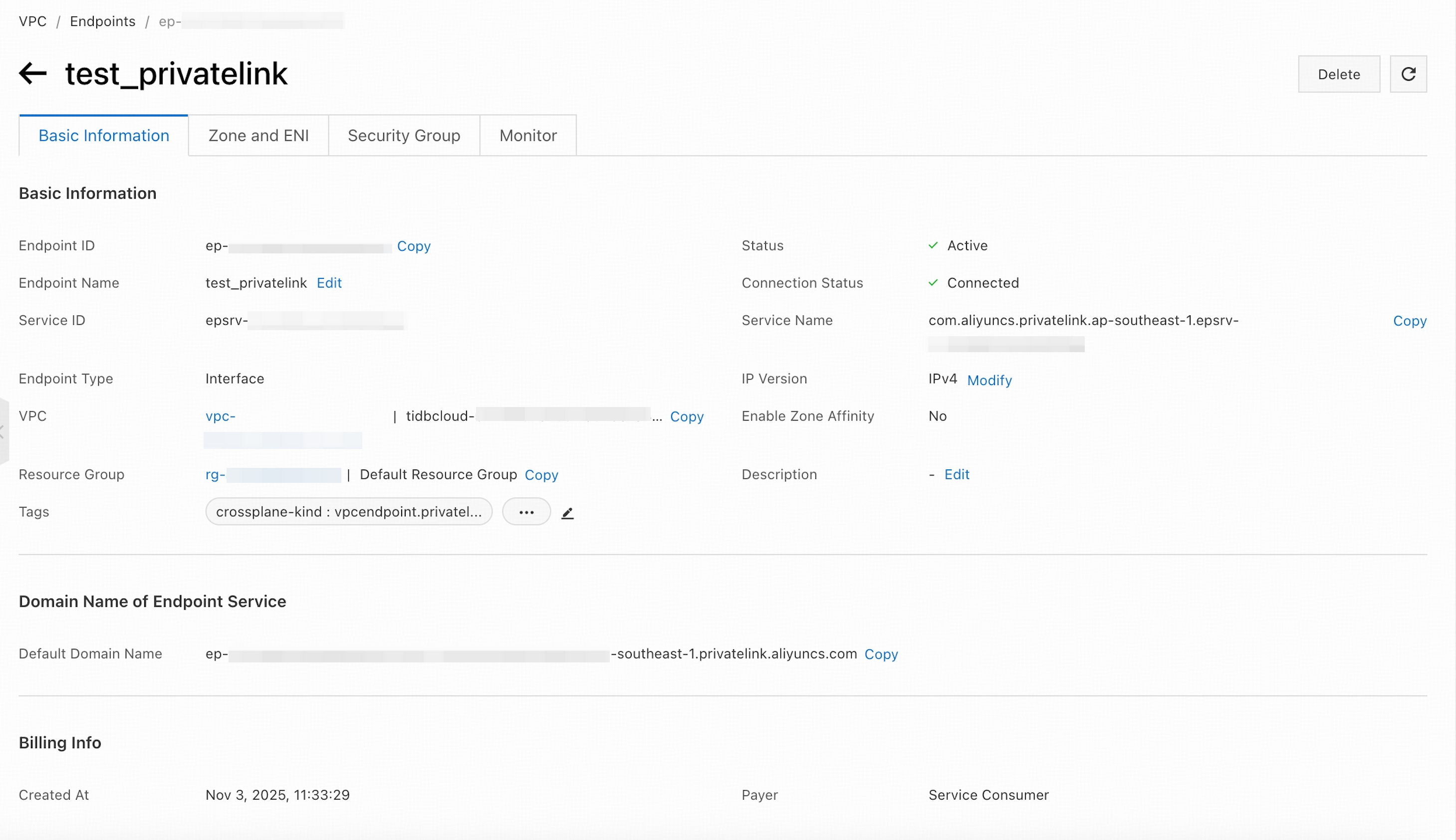
After creating the interface endpoint, navigate to the EndPoints page and select the newly created endpoint.
In the Basic Information section, copy the Endpoint ID. You will use this value later as the Endpoint Resource ID.
In the Domain name of Endpoint Service section, copy the Default Domain Name. You will use this value later as the Domain Name.
Step 3. Accept the endpoint and create the endpoint connection
Return to the Create Alibaba Cloud Private Endpoint Connection dialog in the TiDB Cloud console.
Paste the Endpoint Resource ID and Domain Name that you copied earlier into the corresponding fields.
Click Create Private Endpoint Connection to accept the connection from your private endpoint.
Step 4. Connect to your TiDB Cloud Premium instance
After you have accepted the endpoint connection, you are redirected back to the connection dialog.
Wait for the private endpoint connection status to become Active (approximately 5 minutes). To check the status, navigate to the Networking page by clicking Settings > Networking in the left navigation pane.
In the Connect With drop-down list, select your preferred connection method. The corresponding connection string is displayed at the bottom of the dialog.
Connect to your instance using the connection string.
Private endpoint status reference
To view the statuses of private endpoints or private endpoint services, navigate to the Networking page by clicking Settings > Networking in the left navigation pane.
The possible statuses of a private endpoint are explained as follows:
- Pending: waiting for processing.
- Active: the private endpoint is ready for use.
- Deleting: the private endpoint is being deleted.
- Failed: the private endpoint creation fails. You can delete the private endpoint and create a new one.
The possible statuses of a private endpoint service are explained as follows:
- Creating: the endpoint service is being created, which takes 3 to 5 minutes.
- Active: the endpoint service is created, no matter whether the private endpoint is created or not.