Uploading to Stage
TiDB Cloud Lake recommends two file upload methods for stages: PRESIGN and PUT/GET commands. These methods enable direct data transfer between the client and your storage, eliminating intermediaries and resulting in cost savings by reducing traffic between TiDB Cloud Lake and your storage.
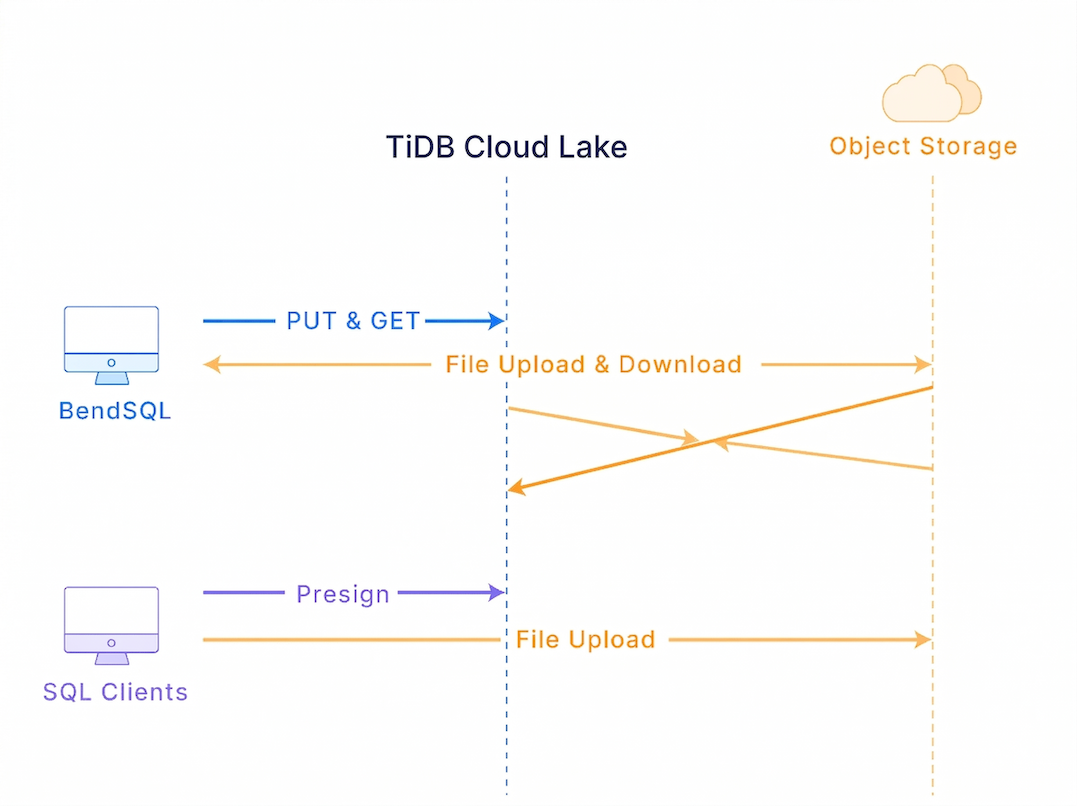
The PRESIGN method generates a time-limited URL with a signature, which clients can use to securely initiate file uploads. This URL grants temporary access to the designated stage, allowing clients to directly transfer data without relying on TiDB Cloud Lake servers for the entire process, enhancing both security and efficiency.
If you're using LakeSQL to manage files in a stage, you can use the PUT command for uploading files and the GET command for downloading files.
- The GET command currently can only download all files in a stage, not individual ones.
- These commands are exclusive to LakeSQL and the GET command will not function when TiDB Cloud Lake uses the file system as the storage backend.
Uploading with Presigned URL
The following examples demonstrate how to upload a sample file (books.parquet) to the user stage, an internal stage, and an external stage with presigned URLs.
PRESIGN UPLOAD @~/books.parquet;
Result:
┌────────┬────────────────────────────────────────────────────────────────────────────────────────────────────────────────────┐
│ Name   │ Value                                                                                                              │
├────────┼────────────────────────────────────────────────────────────────────────────────────────────────────────────────────┤
│ method │ PUT                                                                                                                │
│ headers│ {"host":"s3.us-east-2.amazonaws.com"}                                                                              │
│ url    │ https://s3.us-east-2.amazonaws.com/lake-toronto/stage/user/root/books.parquet?X-Amz-Algorithm...               │
└────────┴────────────────────────────────────────────────────────────────────────────────────────────────────────────────────┘
curl -X PUT -T books.parquet "https://s3.us-east-2.amazonaws.com/lake-toronto/stage/user/root/books.parquet?X-Amz-Algorithm=... ...
Check the staged file:
LIST @~;
Result:
┌───────────────┬──────┬──────────────────────────────────────┬─────────────────────────────────┬─────────┐
│ name          │ size │ md5                                  │ last_modified                   │ creator │
├───────────────┼──────┼──────────────────────────────────────┼─────────────────────────────────┼─────────┤
│ books.parquet │  998 │ 88432bf90aadb79073682988b39d461c     │ 2023-06-27 16:03:51.000 +0000   │         │
└───────────────┴──────┴──────────────────────────────────────┴─────────────────────────────────┴─────────┘
CREATE STAGE my_internal_stage;
PRESIGN UPLOAD @my_internal_stage/books.parquet;
Result:
┌─────────┬─────────────────────────────────────────────────────────────────────────────────────────────────────────────────────────────────────────────────────────────────────────────────────────────────────────────────────────────────────────────────────────────────────────────────────────────────────────────────────────────────────────────────────────────────────────────────────┐
│ Name    │ Value                                                                                                                                                                                                                                                                                                                                                                                                                               │
├─────────┼─────────────────────────────────────────────────────────────────────────────────────────────────────────────────────────────────────────────────────────────────────────────────────────────────────────────────────────────────────────────────────────────────────────────────────────────────────────────────────────────────────────────────────────────────────────────────────┤
│ method  │ PUT                                                                                                                                                                                                                                                                                                                                                                                                                                 │
│ headers │ {"host":"s3.us-east-2.amazonaws.com"}                                                                                                                                                                                                                                                                                                                                                                                               │
│ url     │ https://s3.us-east-2.amazonaws.com/lake-toronto/stage/internal/my_internal_stage/books.parquet?X-Amz-Algorithm=AWS4-HMAC-SHA256&X-Amz-Credential=<access-key-id>%2F20230628%2Fus-east-2%2Fs3%2Faws4_request&X-Amz-Date=20230628T022951Z&X-Amz-Expires=3600&X-Amz-SignedHeaders=host&X-Amz-Signature=9cfcdf3b3554280211f88629d60358c6d6e6a5e49cd83146f1daea7dfe37f5c1 │
└─────────┴─────────────────────────────────────────────────────────────────────────────────────────────────────────────────────────────────────────────────────────────────────────────────────────────────────────────────────────────────────────────────────────────────────────────────────────────────────────────────────────────────────────────────────────────────────────────────────┘
curl -X PUT -T books.parquet "https://s3.us-east-2.amazonaws.com/lake-toronto/stage/internal/my_internal_stage/books.parquet?X-Amz-Algorithm=AWS4-HMAC-SHA256&X-Amz-Credential=<access-key-id>%2F20230628%2Fus-east-2%2Fs3%2Faws4_request&X-Amz-Date=20230628T022951Z&X-Amz-Expires=3600&X-Amz-SignedHeaders=host&X-Amz-Signature=9cfcdf3b3554280211f88629d60358c6d6e6a5e49cd83146f1daea7dfe37f5c1"
Check the staged file:
LIST @my_internal_stage;
Result:
┌──────────────────────────────────┬───────┬──────────────────────────────────────┬─────────────────────────────────┬─────────┐
│ name                             │ size  │ md5                                  │ last_modified                  │ creator │
├──────────────────────────────────┼───────┼──────────────────────────────────────┼─────────────────────────────────┼─────────┤
│ books.parquet                    │   998 │ "88432bf90aadb79073682988b39d461c"     │ 2023-06-28 02:32:15.000 +0000  │         │
└──────────────────────────────────┴───────┴──────────────────────────────────────┴─────────────────────────────────┴─────────┘
CREATE STAGE my_external_stage
URL = 's3://lake'
CONNECTION = (
    ENDPOINT_URL = 'http://127.0.0.1:9000',
    ACCESS_KEY_ID = 'ROOTUSER',
    SECRET_ACCESS_KEY = 'CHANGEME123'
);
PRESIGN UPLOAD @my_external_stage/books.parquet;
Result:
┌─────────┬─────────────────────────────────────────────────────────────────────────────────────────────────────────────────────────────────────────────────────────────────────────────────────────────────────────────────────────────────────────────────────────────────────────────────────────────────────────────────────────────────────────────┐
│ Name    │ Value                                                                                                                                                                                                                                                                                                                             │
├─────────┼─────────────────────────────────────────────────────────────────────────────────────────────────────────────────────────────────────────────────────────────────────────────────────────────────────────────────────────────────────────────────────────────────────────────────────────────────────────────────────────────────────┤
│ method  │ PUT                                                                                                                                                                                                                                                                                                                               │
│ headers │ {"host":"127.0.0.1:9000"}                                                                                                                                                                                                                                                                                                         │
│ url     │ http://127.0.0.1:9000/lake/books.parquet?X-Amz-Algorithm=AWS4-HMAC-SHA256&X-Amz-Credential=ROOTUSER%2F20230628%2Fus-east-1%2Fs3%2Faws4_request&X-Amz-Date=20230628T040959Z&X-Amz-Expires=3600&X-Amz-SignedHeaders=host&X-Amz-Signature=<signature...>                                                    │
└─────────┴─────────────────────────────────────────────────────────────────────────────────────────────────────────────────────────────────────────────────────────────────────────────────────────────────────────────────────────────────────────────────────────────────────────────────────────────────────────────────────────────────────┘
curl -X PUT -T books.parquet "http://127.0.0.1:9000/lake/books.parquet?X-Amz-Algorithm=AWS4-HMAC-SHA256&X-Amz-Credential=ROOTUSER%2F20230628%2Fus-east-1%2Fs3%2Faws4_request&X-Amz-Date=20230628T040959Z&X-Amz-Expires=3600&X-Amz-SignedHeaders=host&X-Amz-Signature=<signature...>"
Check the staged file:
LIST @my_external_stage;
Result:
┌───────────────┬──────┬──────────────────────────────────────┬─────────────────────────────────┬─────────┐
│ name          │ size │ md5                                  │ last_modified                  │ creator │
├───────────────┼──────┼──────────────────────────────────────┼─────────────────────────────────┼─────────┤
│ books.parquet │  998 │ "88432bf90aadb79073682988b39d461c"    │ 2023-06-28 04:13:15.178 +0000  │         │
└───────────────┴──────┴──────────────────────────────────────┴─────────────────────────────────┴─────────┘
Uploading with PUT Command
The following examples demonstrate how to use LakeSQL to upload a sample file (books.parquet) to the user stage, an internal stage, and an external stage with the PUT command.
PUT fs:///Users/eric/Documents/books.parquet @~
Result:
┌───────────────────────────────────────────────┐
│                 file                │  status │
├─────────────────────────────────────┼─────────┤
│ /Users/eric/Documents/books.parquet │ SUCCESS │
└───────────────────────────────────────────────┘
Check the staged file:
LIST @~;
Result:
┌────────────────────────────────────────────────────────────────────────┐
│      name     │  size  │ ··· │     last_modified    │      creator     │
├───────────────┼────────┼─────┼──────────────────────┼──────────────────┤
│ books.parquet │    998 │ ... │ 2023-09-04 03:27:... │ NULL             │
└────────────────────────────────────────────────────────────────────────┘
CREATE STAGE my_internal_stage;
PUT fs:///Users/eric/Documents/books.parquet @my_internal_stage;
Result:
┌───────────────────────────────────────────────┐
│                 file                │  status │
├─────────────────────────────────────┼─────────┤
│ /Users/eric/Documents/books.parquet │ SUCCESS │
└───────────────────────────────────────────────┘
Check the staged file:
LIST @my_internal_stage;
Result:
┌────────────────────────────────────────────────────────────────────────┐
│      name     │  size  │ ··· │     last_modified    │      creator     │
├───────────────┼────────┼─────┼──────────────────────┼──────────────────┤
│ books.parquet │    998 │ ... │ 2023-09-04 03:32:... │ NULL             │
└────────────────────────────────────────────────────────────────────────┘
CREATE STAGE my_external_stage
    URL = 's3://lake'
    CONNECTION = (
        ENDPOINT_URL = 'http://127.0.0.1:9000',
        ACCESS_KEY_ID = 'ROOTUSER',
        SECRET_ACCESS_KEY = 'CHANGEME123'
    );
PUT fs:///Users/eric/Documents/books.parquet @my_external_stage
Result:
┌───────────────────────────────────────────────┐
│                 file                │  status │
├─────────────────────────────────────┼─────────┤
│ /Users/eric/Documents/books.parquet │ SUCCESS │
└───────────────────────────────────────────────┘
Check the staged file:
LIST @my_external_stage;
Result:
┌──────────────────────────────────────────────────────────────────────┐
│         name         │ ··· │     last_modified    │      creator     │
├──────────────────────┼─────┼──────────────────────┼──────────────────┤
│ books.parquet        │ ... │ 2023-09-04 03:37:... │ NULL             │
└──────────────────────────────────────────────────────────────────────┘
Uploading a Directory with PUT Command
You can also upload multiple files from a directory using the PUT command with wildcards. This is useful when you need to stage a large number of files at once.
PUT fs:///home/ubuntu/datas/event_data/*.parquet @your_stage;
Result:
┌───────────────────────────────────────────────────────┐
│                 file                        │status   │
├─────────────────────────────────────────────┼─────────┤
│ /home/ubuntu/datas/event_data/file1.parquet │ SUCCESS │
│ /home/ubuntu/datas/event_data/file2.parquet │ SUCCESS │
│ /home/ubuntu/datas/event_data/file3.parquet │ SUCCESS │
└───────────────────────────────────────────────────────┘
Downloading with GET Command
The following examples demonstrate how to use LakeSQL to download a sample file (books.parquet) from the user stage, an internal stage, and an external stage with the GET command.
LIST @~;
Result:
┌────────────────────────────────────────────────────────────────────────┐
│      name     │  size  │ ··· │     last_modified    │      creator     │
├───────────────┼────────┼─────┼──────────────────────┼──────────────────┤
│ books.parquet │    998 │ ... │ 2023-09-04 03:27:... │ NULL             │
└────────────────────────────────────────────────────────────────────────┘
GET @~/ fs:///Users/eric/Downloads/fromStage/;
Result:
┌─────────────────────────────────────────────────────────┐
│                      file                     │  status │
├───────────────────────────────────────────────┼─────────┤
│ /Users/eric/Downloads/fromStage/books.parquet │ SUCCESS │
└─────────────────────────────────────────────────────────┘
LIST @my_internal_stage;
Result:
┌────────────────────────────────────────────────────────────────────────┐
│      name     │  size  │ ··· │     last_modified    │      creator     │
├───────────────┼────────┼─────┼──────────────────────┼──────────────────┤
│ books.parquet │    998 │ ... │ 2023-09-04 03:32:... │ NULL             │
└────────────────────────────────────────────────────────────────────────┘
GET @my_internal_stage/ fs:///Users/eric/Downloads/fromStage/;
Result:
┌─────────────────────────────────────────────────────────┐
│                      file                     │  status │
├───────────────────────────────────────────────┼─────────┤
│ /Users/eric/Downloads/fromStage/books.parquet │ SUCCESS │
└─────────────────────────────────────────────────────────┘
LIST @my_external_stage;
Result:
┌──────────────────────────────────────────────────────────────────────┐
│         name         │ ··· │     last_modified    │      creator     │
├──────────────────────┼─────┼──────────────────────┼──────────────────┤
│ books.parquet        │ ... │ 2023-09-04 03:37:... │ NULL             │
└──────────────────────────────────────────────────────────────────────┘
GET @my_external_stage/ fs:///Users/eric/Downloads/fromStage/;
Result:
┌─────────────────────────────────────────────────────────┐
│                      file                     │  status │
├───────────────────────────────────────────────┼─────────┤
│ /Users/eric/Downloads/fromStage/books.parquet │ SUCCESS │
└─────────────────────────────────────────────────────────┘