Data Lineage
Data lineage shows how data moves from source objects to target objects. Use it to understand dependencies, assess the impact of a change, troubleshoot data pipelines, and trace a derived column back to its source.
TiDB Cloud Lake records both object-level and column-level relationships:
- Upstream lineage identifies the tables, views, or stages that supply data to an object.
- Downstream lineage identifies the objects that consume data from an object.
- Column lineage maps source columns to the derived target columns.
Enable Data Lineage
TiDB Cloud Lake manages lineage configuration for warehouses that support the Lineage tab (Data > Databases > databaseName > tableName).
Generate Lineage
After lineage is enabled, TiDB Cloud Lake automatically records relationships created by operations such as CREATE TABLE ... AS SELECT, CREATE VIEW, INSERT ... SELECT, multi-table INSERT, REPLACE, MERGE, and COPY. Streams are resolved to their backing tables.
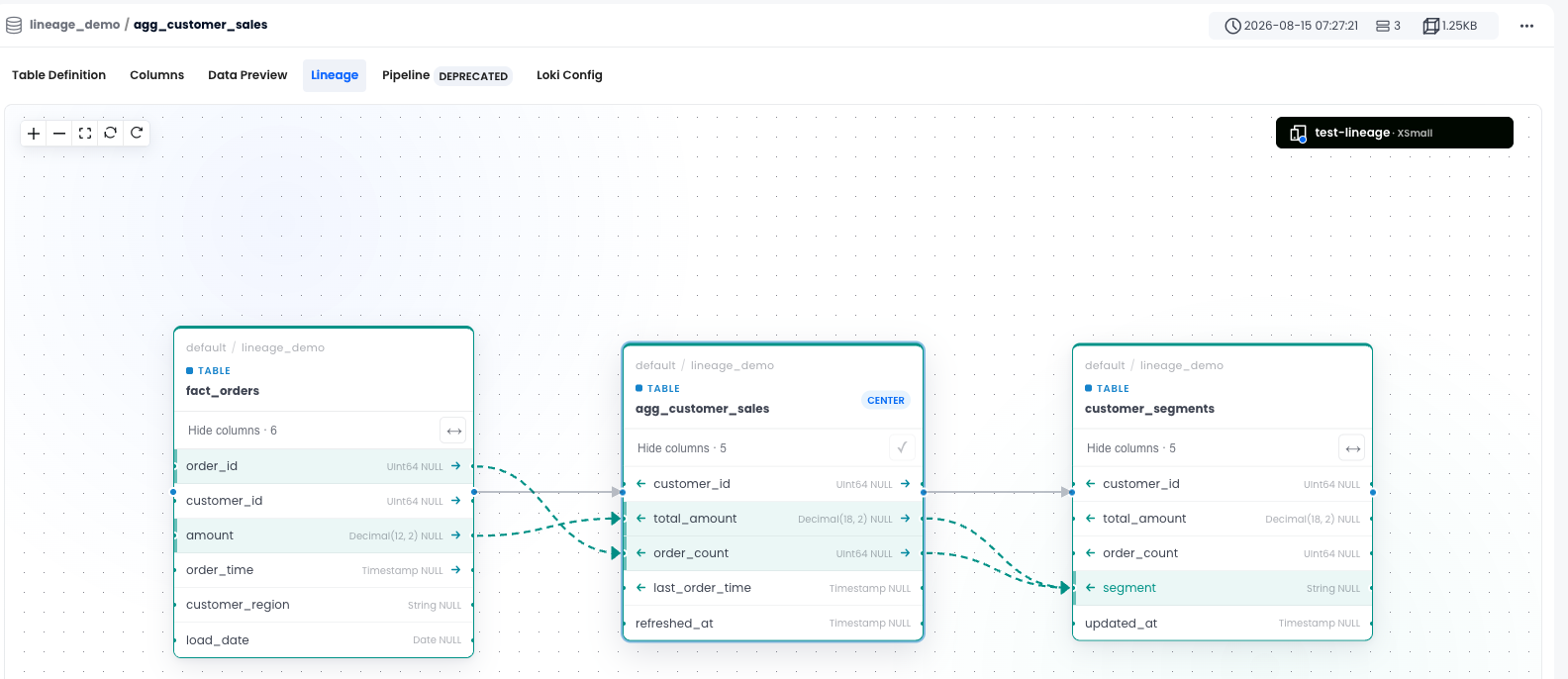
The following example creates a two-hop lineage path:
CREATE OR REPLACE DATABASE lineage_demo;

CREATE OR REPLACE TABLE lineage_demo.fact_orders (
    order_id BIGINT,
    customer_id BIGINT,
    amount DECIMAL(12, 2),
    order_time TIMESTAMP
);

CREATE OR REPLACE TABLE lineage_demo.agg_customer_sales AS
SELECT
    customer_id,
    sum(amount) AS total_amount,
    count(*) AS order_count,
    max(order_time) AS last_order_time
FROM lineage_demo.fact_orders
GROUP BY customer_id;

CREATE OR REPLACE TABLE lineage_demo.customer_segments AS
SELECT
    customer_id,
    total_amount,
    order_count,
    if(total_amount >= 1000, 'high_value', 'standard') AS segment,
    now() AS updated_at
FROM lineage_demo.agg_customer_sales;
Explore Lineage
In TiDB Cloud Lake, open a table or view in Database Explorer and select the Lineage tab. The graph displays upstream and downstream objects, with column connections when column lineage is available.
To retrieve lineage with SQL, use the GET_LINEAGE table function:
SELECT
    distance,
    source_object_database,
    source_object_name,
    target_object_database,
    target_object_name
FROM GET_LINEAGE(
    'lineage_demo.agg_customer_sales',
    'TABLE',
    'UPSTREAM',
    2
)
ORDER BY distance;
For column-level lineage, qualify the column name and use the COLUMN domain:
SELECT
    distance,
    source_object_name,
    source_column_name,
    target_object_name,
    target_column_name
FROM GET_LINEAGE(
    'lineage_demo.customer_segments.segment',
    'COLUMN',
    'UPSTREAM',
    2
)
ORDER BY distance;
Refresh Lineage for Existing Views
Views created after lineage is enabled are tracked automatically. After enabling lineage on a deployment that already contains views, preview the missing or stale relationships and then refresh them:
REFRESH LINEAGE FOR ALL VIEWS DRY RUN;
REFRESH LINEAGE FOR ALL VIEWS;
The refresh reconciles lineage for all views in the default catalog. It reports only views that need changes or could not be processed; unchanged views are omitted. The command requires the global SUPER privilege. See REFRESH LINEAGE for output details.
Export to OpenMetadata
To view TiDB Cloud Lake lineage in OpenMetadata, use lake-openmetadata-ingestion. The tool pushes metadata (databases, tables, views, and columns) and lineage (table-level and column-level) from TiDB Cloud Lake to OpenMetadata through its REST API. For installation, configuration, and usage, see the project README.
Limitations
GET_LINEAGEtraverses at most five hops.- System and
information_schemaobjects are excluded as lineage sources. - Stages participate in object-level lineage, but staged file fields do not provide stable column-level mappings.
- External-catalog objects can appear as endpoints but are not traversed beyond the external catalog boundary.
- Results include only objects visible to the current role.