Cluster Key
Cluster keys provide automatic data organization to dramatically improve query performance on large tables. TiDB Cloud Lake seamlessly and continually manages all clustering operations in the background - you simply define the cluster key and TiDB Cloud Lake handles the rest.
What Problem Does It Solve?
Large tables without proper organization create significant performance and maintenance challenges:
Example: An e-commerce table with millions of products. Without clustering, querying WHERE category IN ('Electronics', 'Computers') must scan all product categories. With automatic clustering by category, TiDB Cloud Lake continuously groups Electronics and Computers products together, scanning only 2 blocks instead of 1000+ blocks.
Benefits of Automatic Clustering
Ease-of-Maintenance: TiDB Cloud Lake eliminates the need for:
- Monitoring the state of clustered tables
- Manually triggering re-clustering operations
- Designating compute resources for clustering
- Scheduling maintenance windows
How it Works: After you define a cluster key, TiDB Cloud Lake automatically:
- Monitors table changes from DML operations
- Evaluates when tables would benefit from re-clustering
- Performs background clustering optimization
- Maintains optimal data organization continuously
All you need to do is define a clustering key for each table (if appropriate) and TiDB Cloud Lake manages all future maintenance automatically.
How It Works
Cluster keys organize data into storage blocks (Parquet files) based on specified columns:
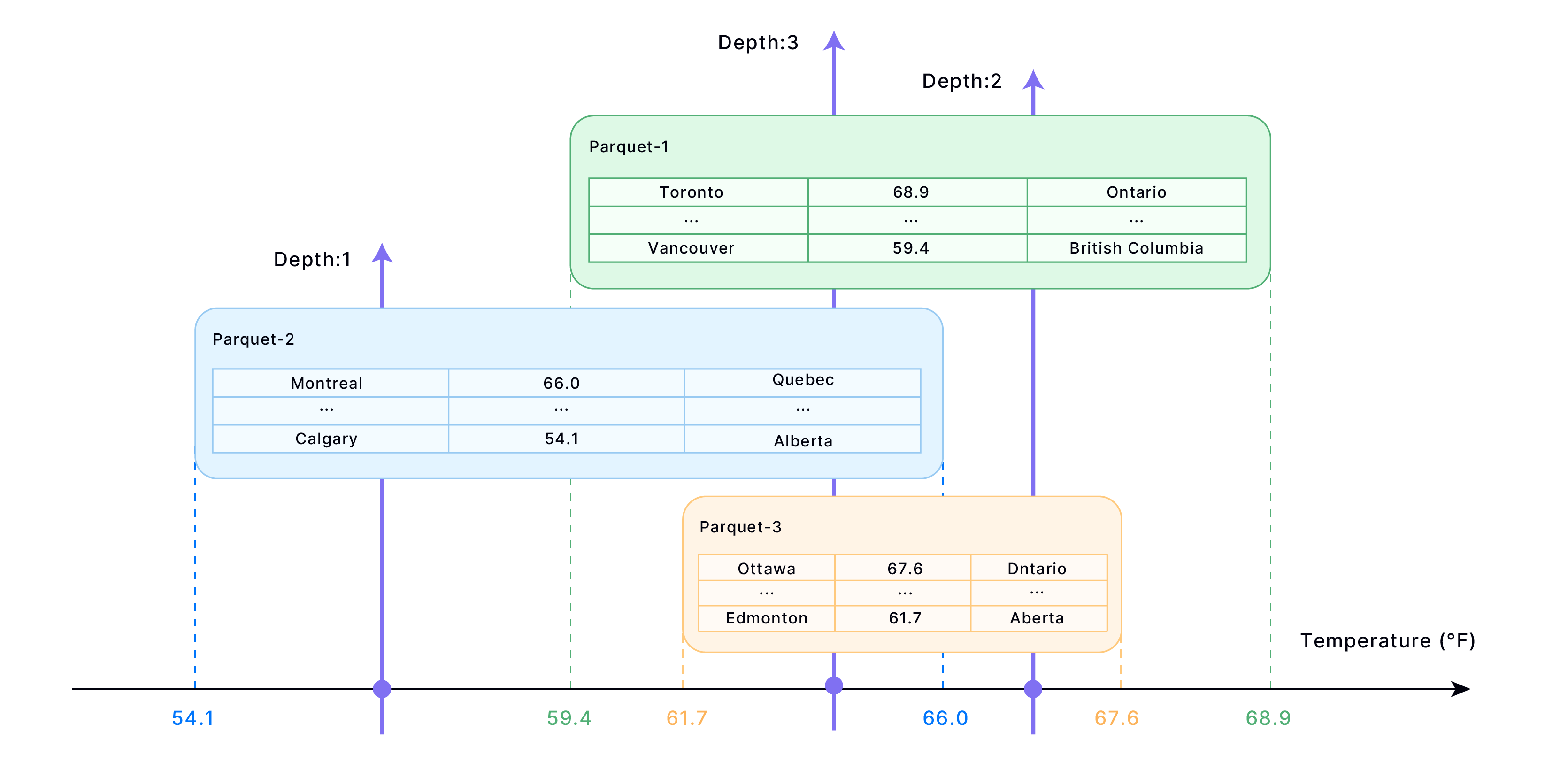
- Data Organization → Similar values grouped into adjacent blocks
- Metadata Creation → Block-to-value mappings stored for fast lookup
- Query Optimization → Only relevant blocks read during queries
- Performance Boost → Fewer rows scanned, faster results
Quick Setup
-- Create table with cluster key
CREATE TABLE sales (
    order_id INT,
    order_date TIMESTAMP,
    region VARCHAR,
    amount DECIMAL
) CLUSTER BY (region);

-- Or add cluster key to existing table
ALTER TABLE sales CLUSTER BY (region, order_date);
Choosing the Right Cluster Key
Select columns based on your most common query filters:
Good vs Bad Cluster Keys
Monitoring Performance
-- Check clustering effectiveness
SELECT * FROM clustering_information('database_name', 'table_name');

-- Key metrics to watch:
-- average_depth: Lower is better (< 2 ideal)
-- average_overlaps: Lower is better
-- block_depth_histogram: More blocks at depth 1-2
When to Re-cluster
Tables become disorganized over time with data changes:
-- Check if re-clustering is needed
SELECT IF(average_depth > 2 * LEAST(GREATEST(total_block_count * 0.001, 1), 16),
          'Re-cluster needed',
          'Clustering is good')
FROM clustering_information('your_database', 'your_table');

-- Re-cluster the table
ALTER TABLE your_table RECLUSTER;
Performance Tuning
Custom Block Size
Adjust block size for better performance:
-- Smaller blocks = fewer rows per query
ALTER TABLE sales SET OPTIONS(
    ROW_PER_BLOCK = 100000,
    BLOCK_SIZE_THRESHOLD = 52428800
);
Automatic Re-clustering
COPY INTOandREPLACE INTOautomatically trigger re-clustering- Monitor clustering metrics regularly
- Re-cluster when
average_depthbecomes too high
Best Practices
Important Notes
When to Use Cluster Keys:
- Large tables (millions+ rows)
- Slow query performance
- Frequent filter-based queries
- Analytical workloads
When NOT to Use:
- Small tables
- Random access patterns
- Frequently changing data
Cluster keys are most effective on large, frequently queried tables with predictable filter patterns. Start with your most common WHERE clause columns.