TiDB Cloud Lake vs. Snowflake: Data Ingestion Benchmark
Overview
We conducted four specific benchmarks to evaluate TiDB Cloud Lake versus Snowflake:
- TPC-H SF100 Dataset Loading: Focuses on loading performance and cost for a large-scale dataset (100GB, ~600 million rows).
- ClickBench Hits Dataset Loading: Tests efficiency in loading a wide-table dataset (76GB, ~100 million rows, 105 columns), emphasizing challenges associated with high column counts.
- 1-Second Freshness: Measures the platforms' ability to ingest data within a strict 1-second freshness requirement.
- 5-Second Freshness: Compares the platforms' data ingestion capabilities under a 5-second freshness constraint.
Platforms
- Snowflake: A well-known cloud data platform emphasizing scalable compute, data sharing.
- TiDB Cloud Lake: A cloud-native data warehouse focusing on scalability and cost-efficiency.
Benchmark Conditions
Conducted on a Small-Size warehouse using data from the same S3 bucket.
Performance and Cost Comparison
- TPC-H SF100 Data: TiDB Cloud Lake offers a 48% cost reduction over Snowflake.
- ClickBench Hits Data: TiDB Cloud Lake achieves a 84% cost reduction.
- 1-Second Freshness: TiDB Cloud Lake loads 400 times more data than Snowflake.
- 5-Second Freshness: TiDB Cloud Lake loads over 27 times more data.
Data Ingestion Benchmarks
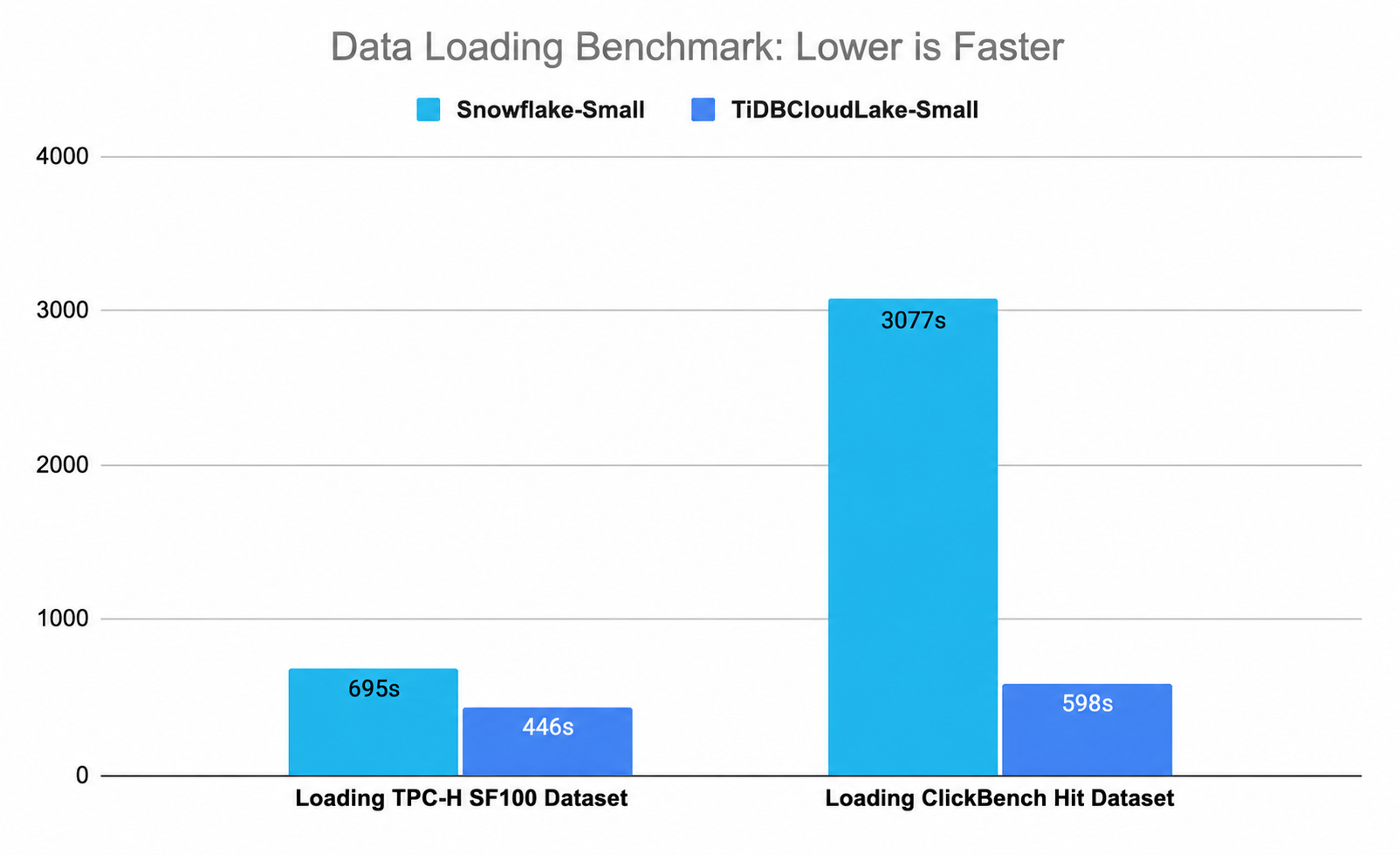
TPC-H SF100 Dataset
- Data Volume: 100GB
- Rows: Approx. 600 million
ClickBench Hits Dataset
- Data Volume: 76GB
- Rows: Approx. 100 million
- Table Width: 105 columns
Freshness Benchmarks
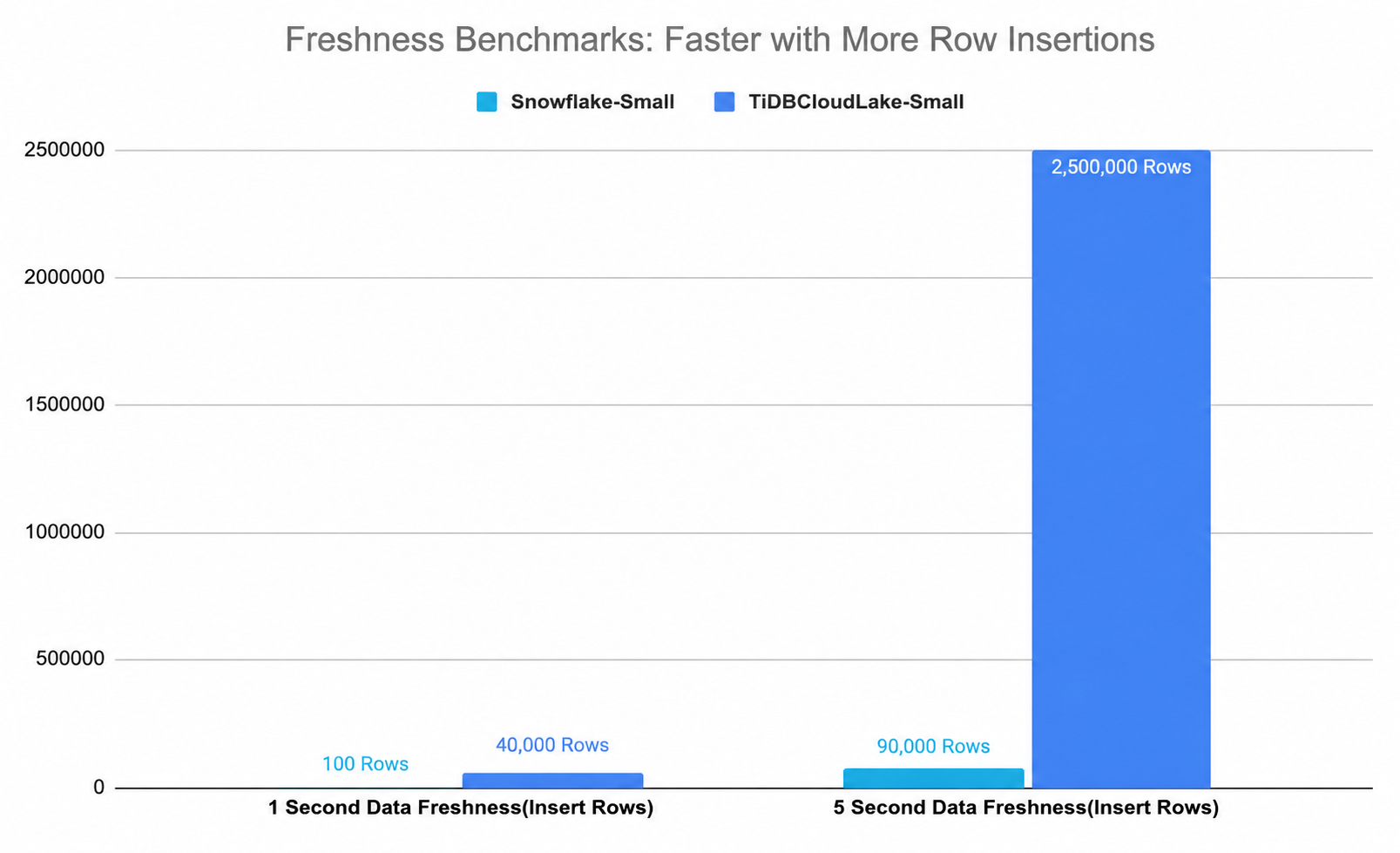
1-Second Freshness Benchmark
Evaluates the volume of data ingested within a 1-second freshness requirement.
5-Second Freshness Benchmark
Assesses the volume of data that can be ingested within a 5-second freshness requirement.
Reproduce the Benchmark
You can reproduce the benchmark by following the steps below.
Benchmark Environment
The benchmark tests both Snowflake and TiDB Cloud Lake under similar conditions:
- The TPC-H SF100 dataset, sourced from Amazon Redshift.
- The ClickBench dataset, sourced from ClickBench.
Prerequisites
- Have a Snowflake account
- Create a TiDB Cloud Lake account
Data Ingestion Benchmark
The data ingestion benchmark can be reproduced using the following steps:
TPC-H Data Loading
Snowflake Data Load:
- Log into your Snowflake account.
- Create tables corresponding to the TPC-H schema. SQL Script.
- Use the
COPY INTOcommand to load the data from AWS S3. SQL Script.
TiDB Cloud Lake Data Load:
- Sign in to your TiDB Cloud Lake account.
- Create the necessary tables as per the TPC-H schema. SQL Script.
- Use a method similar to Snowflake for loading data from AWS S3. SQL Script.
ClickBench Hits Data Loading
Snowflake Data Load:
- Log into your Snowflake account.
- Create tables corresponding to the
hitsschema. SQL Script. - Use the
COPY INTOcommand to load the data from AWS S3. SQL Script.
TiDB Cloud Lake Data Load:
- Sign in to your TiDB Cloud Lake account.
- Create the necessary tables as per the
hitsschema. SQL Script. - Use a method similar to Snowflake for loading data from AWS S3. SQL Script.
Freshness Benchmark
Data generation and ingestion for the freshness benchmark can be reproduced using the following steps:
Create an external stage in TiDB Cloud Lake.
CREATE STAGE hits_unload_stage
URL = 's3://unload/files/'
CONNECTION = (
    ACCESS_KEY_ID = '<your-access-key-id>',
    SECRET_ACCESS_KEY = '<your-secret-access-key>'
);
Unload data to the external stage.
CREATE or REPLACE FILE FORMAT tsv_unload_format_gzip
    TYPE = TSV,
    COMPRESSION = gzip;

COPY INTO @hits_unload_stage
FROM (
    SELECT *
    FROM hits limit <the-rows-you-want>
)
FILE_FORMAT = (FORMAT_NAME = 'tsv_unload_format_gzip')
DETAILED_OUTPUT = true;
Load data from the external stage to the
hitstable.COPY INTO hits FROM @hits_unload_stage PATTERN = '.*[.]tsv.gz' FILE_FORMAT = (TYPE = TSV, COMPRESSION=auto);Measure results from the dashboard.