TiCDC Simple Protocol
Starting from v8.0.0, TiCDC supports the Simple protocol. This document describes how to use the TiCDC Simple protocol and the data format implementation.
Use the TiCDC Simple protocol
When you use Kafka as the downstream, specify protocol as "simple" in the changefeed configuration. Then TiCDC encodes each row change or DDL event as a message, and sends the data change event to the downstream.
The configuration example for using the Simple protocol is as follows:
sink-uri configuration:
--sink-uri = "kafka://127.0.0.1:9092/topic-name?kafka-version=2.4.0"
Changefeed configuration:
[sink]
protocol = "simple"

# The following configuration parameters control the sending behavior of bootstrap messages.
# send-bootstrap-interval-in-sec controls the time interval for sending bootstrap messages, in seconds.
# The default value is 120 seconds, which means that a bootstrap message is sent every 120 seconds for each table.
send-bootstrap-interval-in-sec = 120

# send-bootstrap-in-msg-count controls the message interval for sending bootstrap, in message count.
# The default value is 10000, which means that a bootstrap message is sent every 10000 row changed messages for each table.
send-bootstrap-in-msg-count = 10000
# Note: If you want to disable the sending of bootstrap messages, set both send-bootstrap-interval-in-sec and send-bootstrap-in-msg-count to 0.

# send-bootstrap-to-all-partition controls whether to send bootstrap messages to all partitions.
# The default value is true, which means that bootstrap messages are sent to all partitions of the corresponding table topic.
# Setting it to false means bootstrap messages are sent to only the first partition of the corresponding table topic.
send-bootstrap-to-all-partition = true

[sink.kafka-config.codec-config]
# encoding-format controls the encoding format of the Simple protocol messages. Currently, the Simple protocol message supports "json" and "avro" encoding formats.
# The default value is "json".
encoding-format = "json"
Message types
The TiCDC Simple protocol has the following message types.
DDL:
CREATE: the creating table event.RENAME: the renaming table event.CINDEX: the creating index event.DINDEX: the deleting index event.ERASE: the deleting table event.TRUNCATE: the truncating table event.ALTER: the altering table event, including adding columns, dropping columns, modifying column types, and otherALTER TABLEstatements supported by TiCDC.QUERY: other DDL events.
DML:
INSERT: the inserting event.UPDATE: the updating event.DELETE: the deleting event.
Other:
WATERMARK: containing a TSO (that is, a 64-bit timestamp) of the upstream TiDB cluster, which marks the table replication progress. All events earlier than the watermark have been sent to the downstream.BOOTSTRAP: containing the schema information of a table, used to build the table schema for the downstream.
Message format
In the Simple protocol, each message contains only one event. The Simple protocol supports encoding messages in JSON and Avro formats. This document uses JSON format as an example. For Avro format messages, their fields and meanings are the same as those in JSON format messages, but the encoding format is different. For details about the Avro format, see Simple Protocol Avro Schema.
DDL
TiCDC encodes a DDL event in the following JSON format:
{
   "version":1,
   "type":"ALTER",
   "sql":"ALTER TABLE `user` ADD COLUMN `createTime` TIMESTAMP",
   "commitTs":447987408682614795,
   "buildTs":1708936343598,
   "tableSchema":{
      "schema":"simple",
      "table":"user",
      "tableID":148,
      "version":447987408682614791,
      "columns":[
         {
            "name":"id",
            "dataType":{
               "mysqlType":"int",
               "charset":"binary",
               "collate":"binary",
               "length":11
            },
            "nullable":false,
            "default":null
         },
         {
            "name":"name",
            "dataType":{
               "mysqlType":"varchar",
               "charset":"utf8mb4",
               "collate":"utf8mb4_bin",
               "length":255
            },
            "nullable":true,
            "default":null
         },
         {
            "name":"age",
            "dataType":{
               "mysqlType":"int",
               "charset":"binary",
               "collate":"binary",
               "length":11
            },
            "nullable":true,
            "default":null
         },
         {
            "name":"score",
            "dataType":{
               "mysqlType":"float",
               "charset":"binary",
               "collate":"binary",
               "length":12
            },
            "nullable":true,
            "default":null
         },
         {
            "name":"createTime",
            "dataType":{
               "mysqlType":"timestamp",
               "charset":"binary",
               "collate":"binary",
               "length":19
            },
            "nullable":true,
            "default":null
         }
      ],
      "indexes":[
         {
            "name":"primary",
            "unique":true,
            "primary":true,
            "nullable":false,
            "columns":[
               "id"
            ]
         }
      ]
   },
   "preTableSchema":{
      "schema":"simple",
      "table":"user",
      "tableID":148,
      "version":447984074911121426,
      "columns":[
         {
            "name":"id",
            "dataType":{
               "mysqlType":"int",
               "charset":"binary",
               "collate":"binary",
               "length":11
            },
            "nullable":false,
            "default":null
         },
         {
            "name":"name",
            "dataType":{
               "mysqlType":"varchar",
               "charset":"utf8mb4",
               "collate":"utf8mb4_bin",
               "length":255
            },
            "nullable":true,
            "default":null
         },
         {
            "name":"age",
            "dataType":{
               "mysqlType":"int",
               "charset":"binary",
               "collate":"binary",
               "length":11
            },
            "nullable":true,
            "default":null
         },
         {
            "name":"score",
            "dataType":{
               "mysqlType":"float",
               "charset":"binary",
               "collate":"binary",
               "length":12
            },
            "nullable":true,
            "default":null
         }
      ],
      "indexes":[
         {
            "name":"primary",
            "unique":true,
            "primary":true,
            "nullable":false,
            "columns":[
               "id"
            ]
         }
      ]
   }
}
The fields in the preceding JSON data are explained as follows:
DML
INSERT
TiCDC encodes an INSERT event in the following JSON format:
{
   "version":1,
   "database":"simple",
   "table":"user",
   "tableID":148,
   "type":"INSERT",
   "commitTs":447984084414103554,
   "buildTs":1708923662983,
   "schemaVersion":447984074911121426,
   "data":{
      "age":"25",
      "id":"1",
      "name":"John Doe",
      "score":"90.5"
   }
}
The fields in the preceding JSON data are explained as follows:
The INSERT event contains the data field, and does not contain the old field.
UPDATE
TiCDC encodes an UPDATE event in the following JSON format:
{
   "version":1,
   "database":"simple",
   "table":"user",
   "tableID":148,
   "type":"UPDATE",
   "commitTs":447984099186180098,
   "buildTs":1708923719184,
   "schemaVersion":447984074911121426,
   "data":{
      "age":"25",
      "id":"1",
      "name":"John Doe",
      "score":"95"
   },
   "old":{
      "age":"25",
      "id":"1",
      "name":"John Doe",
      "score":"90.5"
   }
}
The fields in the preceding JSON data are explained as follows:
The UPDATE event contains both the data and old fields, which represent the data after and before updating respectively.
DELETE
TiCDC encodes a DELETE event in the following JSON format:
{
   "version":1,
   "database":"simple",
   "table":"user",
   "tableID":148,
   "type":"DELETE",
   "commitTs":447984114259722243,
   "buildTs":1708923776484,
   "schemaVersion":447984074911121426,
   "old":{
      "age":"25",
      "id":"1",
      "name":"John Doe",
      "score":"95"
   }
}
The fields in the preceding JSON data are explained as follows:
The DELETE event contains the old field, and does not contain the data field.
WATERMARK
TiCDC encodes a WATERMARK event in the following JSON format:
{
   "version":1,
   "type":"WATERMARK",
   "commitTs":447984124732375041,
   "buildTs":1708923816911
}
The fields in the preceding JSON data are explained as follows:
BOOTSTRAP
TiCDC encodes a BOOTSTRAP event in the following JSON format:
{
   "version":1,
   "type":"BOOTSTRAP",
   "commitTs":0,
   "buildTs":1708924603278,
   "tableSchema":{
      "schema":"simple",
      "table":"new_user",
      "tableID":148,
      "version":447984074911121426,
      "columns":[
         {
            "name":"id",
            "dataType":{
               "mysqlType":"int",
               "charset":"binary",
               "collate":"binary",
               "length":11
            },
            "nullable":false,
            "default":null
         },
         {
            "name":"name",
            "dataType":{
               "mysqlType":"varchar",
               "charset":"utf8mb4",
               "collate":"utf8mb4_bin",
               "length":255
            },
            "nullable":true,
            "default":null
         },
         {
            "name":"age",
            "dataType":{
               "mysqlType":"int",
               "charset":"binary",
               "collate":"binary",
               "length":11
            },
            "nullable":true,
            "default":null
         },
         {
            "name":"score",
            "dataType":{
               "mysqlType":"float",
               "charset":"binary",
               "collate":"binary",
               "length":12
            },
            "nullable":true,
            "default":null
         }
      ],
      "indexes":[
         {
            "name":"primary",
            "unique":true,
            "primary":true,
            "nullable":false,
            "columns":[
               "id"
            ]
         }
      ]
   }
}
The fields in the preceding JSON data are explained as follows:
Message generation and sending rules
DDL
- Generation time: TiCDC sends a DDL event after all transactions before this DDL event have been sent.
- Destination: TiCDC sends DDL events to all partitions of the corresponding topic.
DML
- Generation time: TiCDC sends DML events in the order of the
commitTsof the transaction. - Destination: TiCDC sends DDL events to the corresponding partition of the corresponding topic according to the user-configured dispatch rules.
WATERMARK
- Generation time: TiCDC sends
WATERMARKevents periodically to mark the replication progress of a changefeed. The current interval is 1 second. - Destination: TiCDC sends
WATERMARKevents to all partitions of the corresponding topic.
BOOTSTRAP
- Generation time:
- After creating a new changefeed, before the first DML event of a table is sent, TiCDC sends a
BOOTSTRAPevent to the downstream to build the table schema. - Additionally, TiCDC sends
BOOTSTRAPevents periodically to allow newly joined consumers to build the table schema. The default interval is 120 seconds or every 10000 messages. You can adjust the sending interval by configuring thesend-bootstrap-interval-in-secandsend-bootstrap-in-msg-countparameters in thesinkconfiguration. - If a table does not receive any new DML messages within 30 minutes, the table is considered inactive. TiCDC stops sending
BOOTSTRAPevents for the table until new DML events are received.
- After creating a new changefeed, before the first DML event of a table is sent, TiCDC sends a
- Destination: By default, TiCDC sends
BOOTSTRAPevents to all partitions of the corresponding topic. You can adjust the sending strategy by configuring thesend-bootstrap-to-all-partitionparameter in the sink configuration.
Message consumption methods
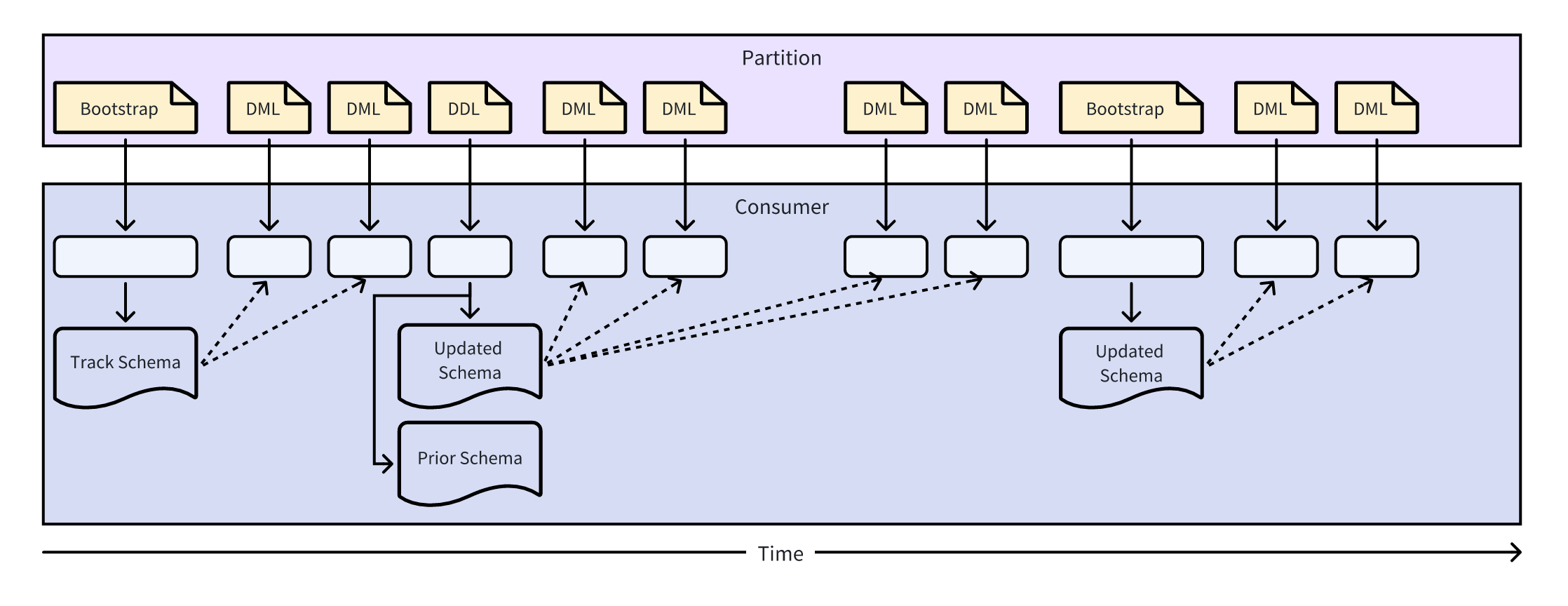
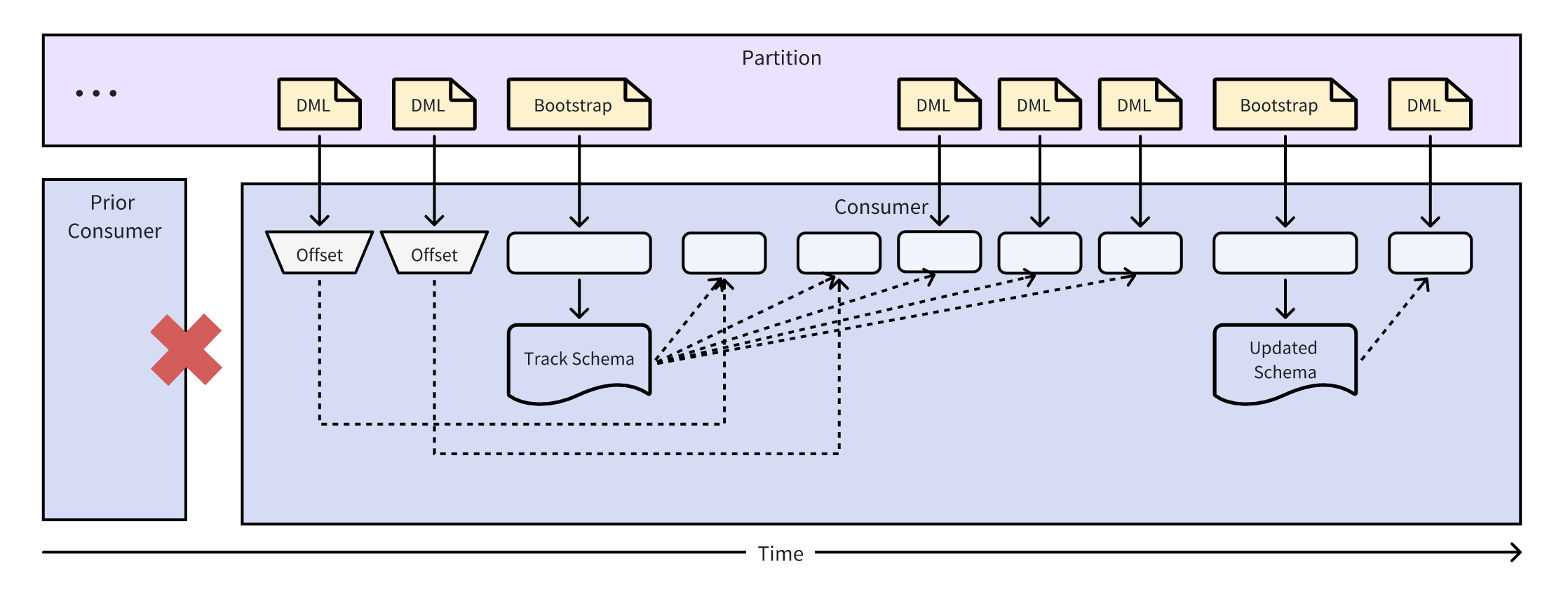
Because the TiCDC Simple protocol does not include the schema information of the table when sending a DML message, the downstream needs to receive the DDL or BOOTSTRAP message and cache the schema information of the table before consuming a DML message. When receiving a DML message, the downstream obtains the corresponding table schema information from the cache by searching the table name and schemaVersion fields of the DML message, and then correctly consumes the DML message.
The following describes how the downstream consumes DML messages based on DDL or BOOTSTRAP messages. According to preceding descriptions, the following information is known:
- Each DML message contains a
schemaVersionfield to mark the schema version number of the table corresponding to the DML message. - Each DDL message contains a
tableSchemaandpreTableSchemafield to mark the schema information of the table before and after the DDL event. - Each BOOTSTRAP message contains a
tableSchemafield to mark the schema information of the table corresponding to the BOOTSTRAP message.
The consumption methods are introduced in the following two scenarios.
Scenario 1: The consumer starts consuming from the beginning
In this scenario, the consumer starts consuming from the creation of a table, so the consumer can receive all DDL and BOOTSTRAP messages of the table. In this case, the consumer can obtain the schema information of the table through the table name and schemaVersion field of the DML message. The detailed process is as follows:
Scenario 2: The consumer starts consuming from the middle
When a new consumer joins the consumer group, it might start consuming from the middle, so it might miss earlier DDL and BOOTSTRAP messages of the table. In this case, the consumer might receive some DML messages before obtaining the schema information of the table. Therefore, the consumer needs to wait for a period of time until it receives the DDL or BOOTSTRAP message to obtain the schema information of the table. Because TiCDC sends BOOTSTRAP messages periodically, the consumer can always obtain the schema information of the table within a period of time. The detailed process is as follows:
Reference
TableSchema definition
TableSchema is a JSON object that contains the schema information of the table, including the table name, table ID, table version number, column information, and index information. The JSON message format is as follows:
{
    "schema":"simple",
    "table":"user",
    "tableID":148,
    "version":447984074911121426,
    "columns":[
        {
        "name":"id",
        "dataType":{
            "mysqlType":"int",
            "charset":"binary",
            "collate":"binary",
            "length":11
        },
        "nullable":false,
        "default":null
        },
        {
        "name":"name",
        "dataType":{
            "mysqlType":"varchar",
            "charset":"utf8mb4",
            "collate":"utf8mb4_bin",
            "length":255
        },
        "nullable":true,
        "default":null
        },
        {
        "name":"age",
        "dataType":{
            "mysqlType":"int",
            "charset":"binary",
            "collate":"binary",
            "length":11
        },
        "nullable":true,
        "default":null
        },
        {
        "name":"score",
        "dataType":{
            "mysqlType":"float",
            "charset":"binary",
            "collate":"binary",
            "length":12
        },
        "nullable":true,
        "default":null
        }
    ],
    "indexes":[
        {
        "name":"primary",
        "unique":true,
        "primary":true,
        "nullable":false,
        "columns":[
            "id"
        ]
        }
    ]
}
The preceding JSON data is explained as follows:
You can uniquely identify the schema information of a table by the table name and the schema version number.
Column definition
Column is a JSON object that contains the schema information of the column, including the column name, data type, whether it can be null, and the default value.
{
        "name":"id",
        "dataType":{
            "mysqlType":"int",
            "charset":"binary",
            "collate":"binary",
            "length":11
        },
        "nullable":false,
        "default":null
}
The preceding JSON data is explained as follows:
Index definition
Index is a JSON object that contains the schema information of the index, including the index name, whether it is unique, whether it is a primary key, and the index column.
{
        "name":"primary",
        "unique":true,
        "primary":true,
        "nullable":false,
        "columns":[
            "id"
        ]
}
The preceding JSON data is explained as follows:
mysqlType reference table
The following table describes the value range of the mysqlType field in the TiCDC Simple protocol and its type in TiDB (Golang) and Avro (Java). When you need to parse DML messages, you can correctly parse the data according to this table and the mysqlType field in the DML message, depending on the protocol and language you use.
TiDB type (Golang) represents the type of the corresponding mysqlType when it is processed in TiDB and TiCDC (Golang). Avro type (Java) represents the type of the corresponding mysqlType when it is encoded into Avro format messages.
Avro schema definition
The Simple protocol supports outputting messages in Avro format. For details about the Avro format, see Simple Protocol Avro Schema.