Global Indexes
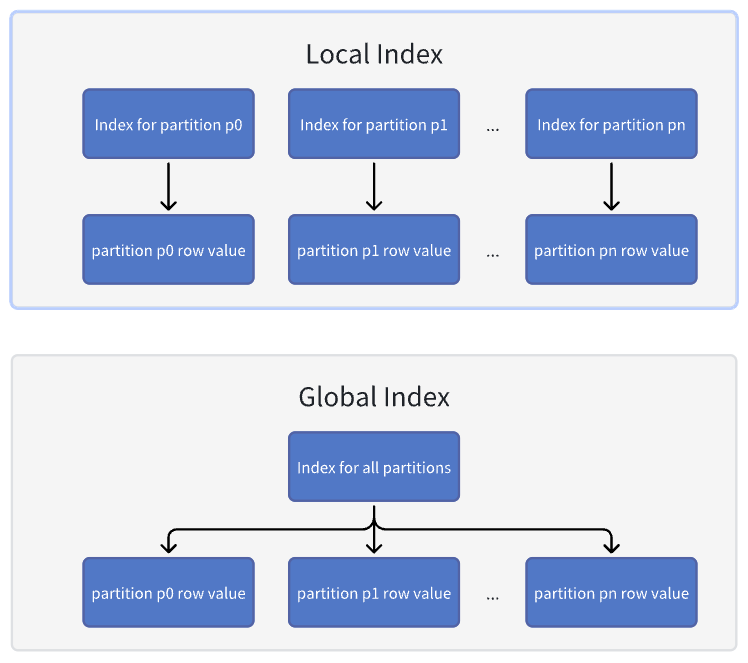
Before introducing global indexes, TiDB created a local index for each partition, meaning one local index per partition. This indexing approach had a limitation that primary keys and unique keys had to include all the partition keys to ensure global uniqueness of data. In addition, when a query needed to access data across multiple partitions, TiDB had to scan the data of each partition to return results.
To address these issues, TiDB introduces the global indexes feature in v8.3.0. A single global index covers data of the entire table, allowing primary keys and unique keys to remain globally unique even when they do not include partition keys. Moreover, with a global index, TiDB can access index data across multiple partitions in a single operation, without having to look up the local index of each partition. This significantly improves query performance for non-partitioning keys. Starting from v8.5.4, non-unique indexes can also be created as global indexes.
Advantages
Global indexes can significantly improve query performance, enhance indexing flexibility, and reduce the cost of data migration and application modifications.
Improved query performance
Global indexes can effectively improve the efficiency of querying non-partitioning columns. When a query involves a non-partitioning column, a global index can quickly locate the relevant data, avoiding full table scans across all partitions. This significantly reduces the number of Coprocessor (cop) tasks, which is especially beneficial in scenarios with a large number of partitions.
Benchmark tests show that when a table contains 100 partitions, performance in the sysbench select_random_points scenario improves by up to 53 times.
Enhanced indexing flexibility
Global indexes remove the restriction that unique keys in partitioned tables must include all partitioning columns. This provides greater flexibility in index design. You can now create indexes based on actual query patterns and business logic, rather than being constrained by the partitioning scheme. This flexibility not only improves query performance but also supports a wider range of application requirements.
Reduced cost for data migration and application modifications
During data migration and application modification, global indexes can significantly reduce the amount of additional adjustment work required. Without global indexes, you might need to change the partitioning scheme or rewrite SQL queries to work around index limitations. With global indexes, these modifications can be avoided, reducing both development and maintenance costs.
For example, when migrating a table from an Oracle database to TiDB, you might encounter unique indexes that do not include partitioning columns, because Oracle supports global indexes. Before TiDB introduced global indexes, you had to modify the table schema to comply with TiDB's partitioning rules. Now, TiDB supports global indexes. When you migrate data, you can simply define those indexes as global, keeping schema behavior consistent with Oracle and greatly reducing migration costs.
Limitations of global indexes
- If the
GLOBALkeyword is not explicitly specified in the index definition, TiDB creates a local index by default. - The
GLOBALandLOCALkeywords only apply to partitioned tables and do not affect non-partitioned tables. In other words, there is no difference between a global index and a local index in non-partitioned tables. - DDL operations such as
DROP PARTITION,TRUNCATE PARTITION, andREORGANIZE PARTITIONalso trigger updates to global indexes. These DDL operations need to wait for the global index updates to complete before returning results, which increases the execution time accordingly. This is particularly evident in data archiving scenarios, such asDROP PARTITIONandTRUNCATE PARTITION. Without global indexes, these operations can typically complete immediately. However, with global indexes, the execution time increases as the number of indexes that need to be updated grows. - Tables that contain global indexes do not support the
EXCHANGE PARTITIONoperation. - By default, the primary key of a partitioned table is a clustered index and must include the partition key. If you require the primary key to exclude the partition key, you can explicitly specify the primary key as a non-clustered global index when creating the table, for example,
PRIMARY KEY(col1, col2) NONCLUSTERED GLOBAL. - If a global index is added to an expression column, or a global index is also a prefix index (for example
UNIQUE KEY idx_id_prefix (id(10)) GLOBAL), you need to collect statistics manually for this global index.
Feature evolution
- Before v7.6.0: TiDB only supports local indexes on partitioned tables. This means that unique keys on partitioned tables have to include all columns in the partition expression. Queries that do not use the partition key have to scan all partitions, resulting in degraded query performance.
- v7.6.0: Introduces the
tidb_enable_global_indexsystem variable to enable global indexes. However, at that time the feature is still under development and is not recommended for production use. - v8.3.0: Global indexes are released as an experimental feature. You can explicitly create a global index using the
GLOBALkeyword when defining an index. - v8.4.0: The global indexes feature becomes generally available (GA). You can create global indexes directly using the
GLOBALkeyword without setting thetidb_enable_global_indexsystem variable. Starting from this version, the system variable is deprecated and its value is fixed toON, meaning global indexes are enabled by default. - v8.5.0: Global indexes support including all columns from the partitioning expression.
Global indexes vs. local indexes
The following diagram shows the differences between global indexes and local indexes:
Scenarios for global indexes:
- Infrequent data archiving: For example, in the healthcare industry, some business data must be retained for up to 30 years. Such data is often partitioned monthly, resulting in 360 partitions created at once, with very few
DROPorTRUNCATEoperations afterward. In this scenario, global indexes are more suitable because they provide cross-partition consistency and improved query performance. - Queries that span multiple partitions: When queries need to access data across multiple partitions, global indexes can help avoid full scans across all partitions and enhance query efficiency.
Scenarios for local indexes:
- Frequent data archiving: If data archiving operations occur frequently and most queries are limited to a single partition, local indexes can offer better performance.
- Use of partition exchange: In industries like banking, processed data might be written to a regular table first and then exchanged into a partitioned table after verification, to minimize performance impact on the partitioned table. In this case, local indexes are preferred because once a global index is used, the partitioned table no longer supports partition exchange.
Global indexes vs. clustered indexes
Because of the underlying principle constraints of clustered indexes and global indexes, a single index cannot serve as both a clustered index and a global index at the same time. However, each type offers different performance benefits in different query scenarios. When you need to take advantage of both, you can include the partitioning columns to the clustered index and create a separate global index that does not include the partitioning columns.
Suppose you have the following table schema:
CREATE TABLE `t` (
  `id` int DEFAULT NULL,
  `ts` timestamp NULL DEFAULT NULL,
  `data` varchar(100) DEFAULT NULL
) ENGINE=InnoDB DEFAULT CHARSET=utf8mb4 COLLATE=utf8mb4_bin
PARTITION BY RANGE (UNIX_TIMESTAMP(`ts`))
(PARTITION `p0` VALUES LESS THAN (1735660800)
 PARTITION `p1` VALUES LESS THAN (1738339200)
 ...)
In the preceding t table, the id column contains unique values. To optimize both point queries and range queries, you can define a clustered index PRIMARY KEY(id, ts) in the table creation statement, and a global index UNIQUE KEY id(id) that does not include the partitioning column. This way, point queries based on id will use the global index id and choose a PointGet execution plan. Range queries will use the clustered index because the clustered index avoids an additional table lookup compared with the global index, improving query efficiency.
The modified table schema is as follows:
CREATE TABLE `t` (
  `id` int NOT NULL,
  `ts` timestamp NOT NULL,
  `data` varchar(100) DEFAULT NULL,
  PRIMARY KEY (`id`, `ts`) /*T![clustered_index] CLUSTERED */,
  UNIQUE KEY `id` (`id`) /*T![global_index] GLOBAL */
) ENGINE=InnoDB DEFAULT CHARSET=utf8mb4 COLLATE=utf8mb4_bin
PARTITION BY RANGE (UNIX_TIMESTAMP(`ts`))
(PARTITION `p0` VALUES LESS THAN (1735660800),
 PARTITION `p1` VALUES LESS THAN (1738339200)
 ...)
This approach optimizes point queries based on id while also improving the performance of range queries, and it ensures that the table's partitioning columns are effectively utilized in timestamp-based queries.
Usage
To create a global index, add the GLOBAL keyword in the index definition.
CREATE TABLE t1 (
    col1 INT NOT NULL,
    col2 DATE NOT NULL,
    col3 INT NOT NULL,
    col4 INT NOT NULL,
    UNIQUE KEY uidx12(col1, col2) GLOBAL,
    UNIQUE KEY uidx3(col3),
    KEY idx1(col1) GLOBAL
)
PARTITION BY HASH(col3)
PARTITIONS 4;
In the preceding example, the unique index uidx12 and the non-unique index idx1 become global indexes, while uidx3 remains a regular unique index.
Note that a clustered index cannot be a global index. For example:
CREATE TABLE t2 (
    col1 INT NOT NULL,
    col2 DATE NOT NULL,
    PRIMARY KEY (col2) CLUSTERED GLOBAL
) PARTITION BY HASH(col1) PARTITIONS 5;
ERROR 1503 (HY000): A CLUSTERED INDEX must include all columns in the table's partitioning function
A clustered index cannot also serve as a global index. This is because if a clustered index is global, the table would no longer be partitioned. The key of a clustered index is the key for the partition-level row data, while a global index is defined at the table level, creating a conflict. If you need to make the primary key a global index, you must explicitly define it as a non-clustered index. For example:
PRIMARY KEY(col1, col2) NONCLUSTERED GLOBAL
You can identify global indexes by checking the GLOBAL index option in the output of SHOW CREATE TABLE:
SHOW CREATE TABLE t1\G
       Table: t1
Create Table: CREATE TABLE `t1` (
  `col1` int NOT NULL,
  `col2` date NOT NULL,
  `col3` int NOT NULL,
  `col4` int NOT NULL,
  UNIQUE KEY `uidx12` (`col1`,`col2`) /*T![global_index] GLOBAL */,
  UNIQUE KEY `uidx3` (`col3`),
  KEY `idx1` (`col1`) /*T![global_index] GLOBAL */
) ENGINE=InnoDB DEFAULT CHARSET=utf8mb4 COLLATE=utf8mb4_bin
PARTITION BY HASH (`col3`) PARTITIONS 4
1 row in set (0.00 sec)
Alternatively, you can query the INFORMATION_SCHEMA.TIDB_INDEXES table and check the IS_GLOBAL column in the output to identify global indexes.
SELECT * FROM information_schema.tidb_indexes WHERE table_name='t1';
+--------------+------------+------------+----------+--------------+-------------+----------+---------------+------------+----------+------------+-----------+-----------+
| TABLE_SCHEMA | TABLE_NAME | NON_UNIQUE | KEY_NAME | SEQ_IN_INDEX | COLUMN_NAME | SUB_PART | INDEX_COMMENT | Expression | INDEX_ID | IS_VISIBLE | CLUSTERED | IS_GLOBAL |
+--------------+------------+------------+----------+--------------+-------------+----------+---------------+------------+----------+------------+-----------+-----------+
| test         | t1         |          0 | uidx12   |            1 | col1        |     NULL |               | NULL       |        1 | YES        | NO        |         1 |
| test         | t1         |          0 | uidx12   |            2 | col2        |     NULL |               | NULL       |        1 | YES        | NO        |         1 |
| test         | t1         |          0 | uidx3    |            1 | col3        |     NULL |               | NULL       |        2 | YES        | NO        |         0 |
| test         | t1         |          1 | idx1     |            1 | col1        |     NULL |               | NULL       |        3 | YES        | NO        |         1 |
+--------------+------------+------------+----------+--------------+-------------+----------+---------------+------------+----------+------------+-----------+-----------+
3 rows in set (0.00 sec)
When partitioning a regular table or repartitioning a partitioned table, you can update indexes to be either global indexes or local indexes as needed.
For example, the following SQL statement repartitions table t1 based on column col1, updates the global indexes uidx12 and idx1 to local indexes, and updates the local index uidx3 to a global index. uidx3 is a unique index on column col3. To ensure the uniqueness of col3 across all partitions, uidx3 must be a global index. uidx12 and idx1 are indexes on column col1 and can be either global or local indexes.
ALTER TABLE t1 PARTITION BY HASH (col1) PARTITIONS 3 UPDATE INDEXES (uidx12 LOCAL, uidx3 GLOBAL, idx1 LOCAL);
Working mechanism
This section explains the working mechanism of global indexes, including their design principles and implementation.
Design principles
In TiDB partitioned tables, the key prefix for a local index is the Partition ID, while the prefix for a global index is the Table ID. This design ensures that global index data is distributed contiguously on TiKV, thereby reducing the number of RPC requests required for index lookups.
CREATE TABLE `sbtest` (
  `id` int(11) NOT NULL,
  `k` int(11) NOT NULL DEFAULT '0',
  `c` char(120) NOT NULL DEFAULT '',
  KEY idx(k),
  KEY global_idx(k) GLOBAL
) partition by hash(id) partitions 5;
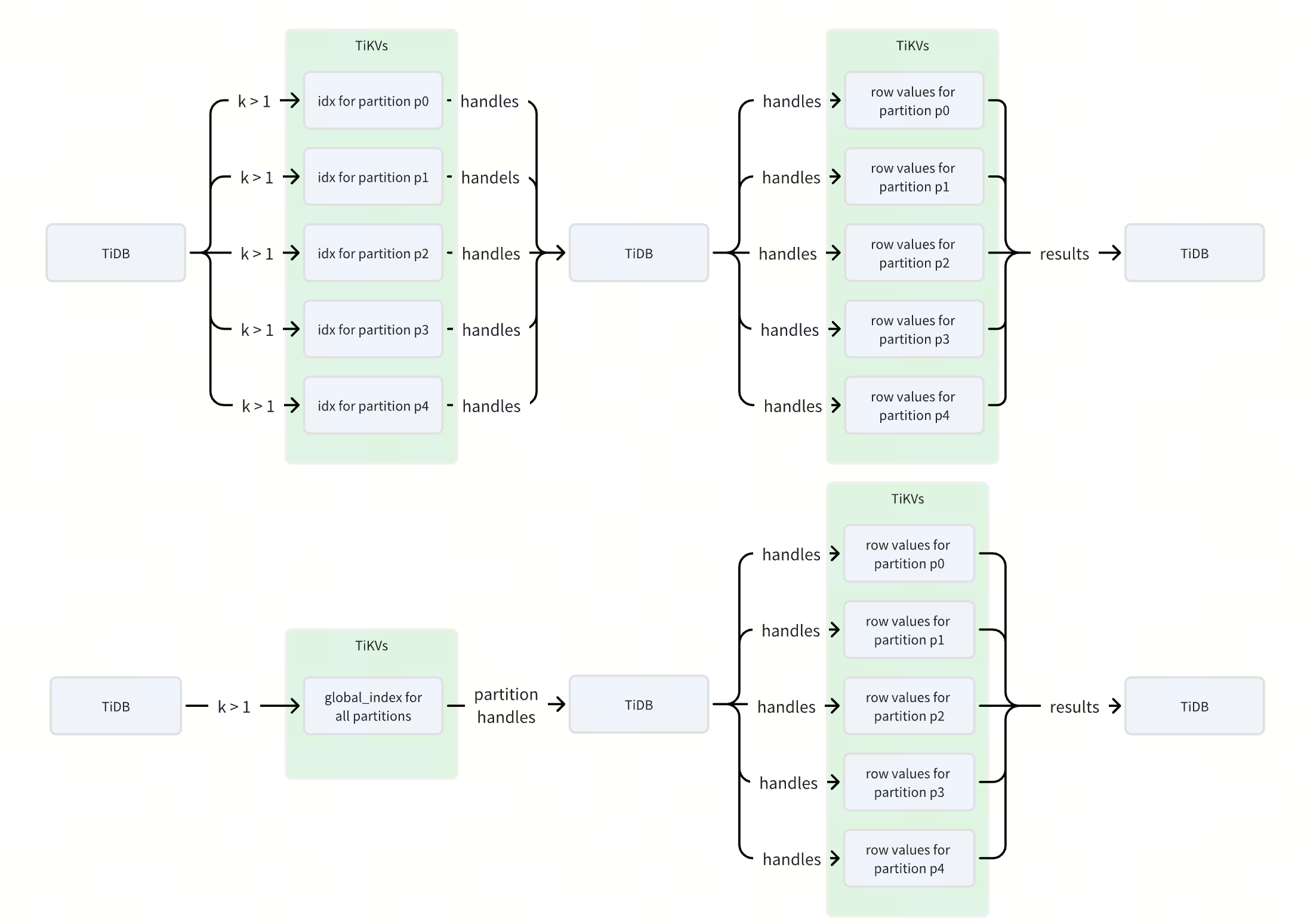
Take the preceding table schema as an example: idx is a local index, and global_idx is a global index. The data for idx is distributed across 5 different ranges, such as PartitionID1_i_xxx and PartitionID2_i_xxx, whereas the data for global_idx is concentrated in a single range (TableID_i_xxx).
When executing a query related to k, such as SELECT * FROM sbtest WHERE k > 1, the local index idx generates 5 separate ranges, while the global index global_idx generates only a single range. Because each range in TiDB corresponds to one or more RPC requests, using a global index can reduce the number of RPC requests by several times, improving index query performance.
The following diagram illustrates the difference in RPC requests and data flow when executing the SELECT * FROM sbtest WHERE k > 1 statement using the two different indexes: idx versus global_idx.
Encoding method
In TiDB, index entries are encoded as key-value pairs. For partitioned tables, each partition is treated as an independent physical table at the TiKV layer, with its own partitionID. Therefore, the encoding of index entries in a partitioned table is as follows:
Unique key
Key:
- PartitionID_indexID_ColumnValues

Value:
- IntHandle
 - TailLen_IntHandle

- CommonHandle
 - TailLen_IndexVersion_CommonHandle

Non-unique key
Key:
- PartitionID_indexID_ColumnValues_Handle

Value:
- IntHandle
 - TailLen_Padding

- CommonHandle
 - TailLen_IndexVersion
For global indexes, the encoding of index entries is different. To ensure that the key layout of global indexes remains compatible with the current index key encoding, the new index encoding layout is defined as follows:
Unique key
Key:
- TableID_indexID_ColumnValues

Value:
- IntHandle
 - TailLen_PartitionID_IntHandle

- CommonHandle
 - TailLen_IndexVersion_CommonHandle_PartitionID

Non-unique key
Key:
- TableID_indexID_ColumnValues_Handle

Value:
- IntHandle
 - TailLen_PartitionID

- CommonHandle
 - TailLen_IndexVersion_PartitionID
This encoding scheme places the TableID at the beginning of the global index key, while the PartitionID is stored in the value. The advantage of this design is that it achieves compatibility with the existing index key encoding. However, it also introduces some challenges. For example, when executing DDL operations such as DROP PARTITION or TRUNCATE PARTITION, extra handling is required because the index entries are not stored contiguously.
Performance test results
The following tests are based on the select_random_points scenario in sysbench, primarily used to compare query performance under different partitioning strategies and indexing methods.
The table schema used in the tests is as follows:
CREATE TABLE `sbtest` (
  `id` int(11) NOT NULL,
  `k` int(11) NOT NULL DEFAULT '0',
  `c` char(120) NOT NULL DEFAULT '',
  `pad` char(60) NOT NULL DEFAULT '',
  PRIMARY KEY (`id`) /*T![clustered_index] CLUSTERED */,
  KEY `k_1` (`k`)
  /* Key `k_1` (`k`, `c`) GLOBAL */
) ENGINE=InnoDB DEFAULT CHARSET=utf8mb4 COLLATE=utf8mb4_bin
/* Partition by hash(`id`) partitions 100 */
/* Partition by range(`id`) xxxx */
The workload SQL is as follows:
SELECT id, k, c, pad
FROM sbtest
WHERE k IN (xx, xx, xx)
Range Partition (100 partitions):
Hash Partition (100 partitions):
The preceding tests demonstrate that in high-concurrency environments, global indexes can significantly improve the query performance of partitioned tables, yielding performance gains of up to 50 times. Furthermore, global indexes substantially reduce Request Unit (RU) consumption. The performance benefits become even more obvious as the number of partitions increases.